|
·
 Debit Order raised at Hyphen: Debit Order raised at Hyphen:
oThis indicates that the debit order has been raised by the PDA.
·
 Hyphen payment made: Hyphen payment made:
oThis indicates that Hyphen has received payment from the client either through debit order or cash payment from the client.
oThis also indicates that a distribution has been successfully done by the PDA.
·
 Unpaid at Hyphen: Unpaid at Hyphen:
oThis indicates that the PDA has no received payment from the client.
oThis also indicates that the creditor has not yet been paid by the PDA.
·
 Payment is suspended: Payment is suspended:
oThis indicates that the money paid to the creditor has been returned to the PDA.
·
 Paid Manually: Paid Manually:
oThis indicates that the period has been marked as"Paid" by the user.
·
 Unpaid Manually: Unpaid Manually:
oThis indicates that the period has been marked as"Unpaid" by the user.
oIf there is no actuals on the payment plan for a certain period and the status is marked Paid, the user can change the status from paid to unpaid, if there is actuals the user will not be able to change the status the program will not allow it.
oThe user can mark a raised or frozen period unpaid as well.
·
 Payment Message Error: Payment Message Error:
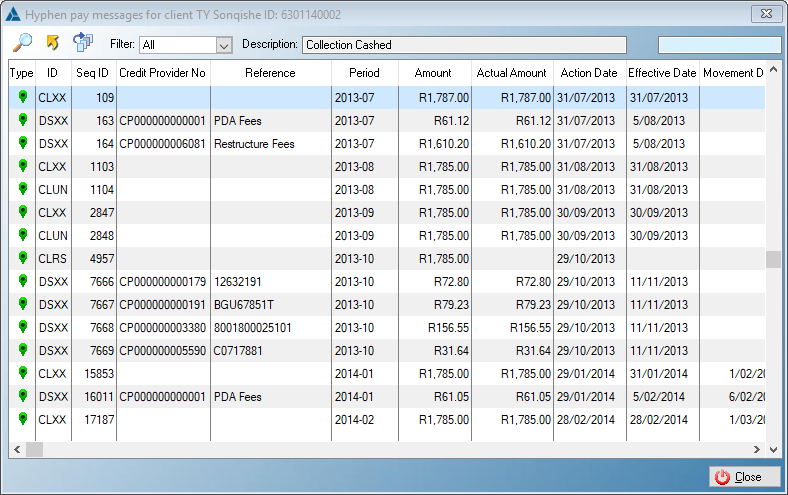
oThis indicates that the there is an error on the message file received from Hyphen either in the message file itself or during the processing phase.
·
 Cascade Period: Cascade Period:
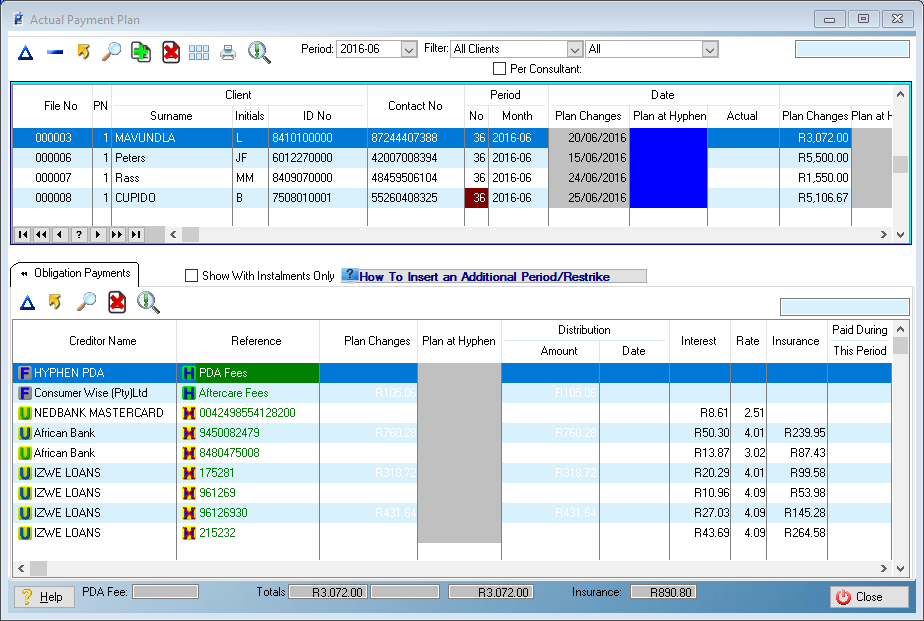
oThis highlight (found in the "Balance CF and the No" column) indicates that the creditor is receiving its last payment (will not appear further on the payment plan.
·
 Inactive Clients/Short Payment: Inactive Clients/Short Payment:
oThis highlight (found in the "File No" column) indicates that the client is inactive.
oThis highlight (found in the "Actual" column) indicates that the client has paid less than the "Plan at Hyphen" amount.
·
 Will not be uploaded to PDA: Will not be uploaded to PDA:
oThis highlight indicates the following:
oThat the period date is in the past and will not be uploaded to the PDA.(found in the "Plan Changes" column)
oThat the period has already been processed by the PDA and no changes can be made to the period (found in the "Plan at Hyphen" column).
o
 The values are the same at Hyphen: The values are the same at Hyphen:
oThis highlight indicates the following:
oThat the figures on Simplicity are the same as the figures currently on the PDA system (found in the "Creditor Name" and/or "Reference" column).
·
 Changes are not uploaded to Hyphen yet: Changes are not uploaded to Hyphen yet:
oThis highlight indicates the following:
oThat the figures on Simplicity are not the same as the figures currently on the PDA system (found in the "Creditor Name" and/or "Reference" column).
oThat the amount on Simplicity is not the same as the amount currently on the PDA system (found in the "Plan Changes" column).
·
 Period removal from Hyphen payment plan requested: Period removal from Hyphen payment plan requested:
oThis indicates that the period has been marked for removal from Hyphen's payment plan but is not yet been uploaded.
·
 Period removal from Hyphen payment plan accepted: Period removal from Hyphen payment plan accepted:
oThis indicates that the period has been removed from Hyphen's payment plan (no payment will be allocated to this period).
·
 Period removal from Hyphen payment plan rejected: Period removal from Hyphen payment plan rejected:
oThis indicates that the period has not been marked for removed from Hyphen's payment plan (may have already been processed by the PDA).
·
 Manual Override: Manual Override:
oThis indicates the following:
oThat the user has manually changed the date and/or amount and/or changed the planed distribution amount (found on the "File No" column).
oThat the user has manually changed the planed distribution amount (found on the "Plan Changes" column).
·
 Additional funding from client outside of payment plan: Additional funding from client outside of payment plan:
oThis highlight (found on the "Period Month" column) indicates that the period has been inserted by the PDA, is indicated on the payment plan with a suffix of "-50" on the period month (e.g.an inserted period for period 2015-11 will be 2015-11-50).
oThis apply to debit order plans only.
·
 Interim period- original interest rates s active on proposal; Interim period- original interest rates s active on proposal;
oThis highlight (found on the "Period Month" and "Rate" columns) indicates the following:
oFees exist for this period on the proposal, original interest rates apply and distributions will be allocated accordingly.
oTo view any Questions on Interim Periods see FAQ >Proposals
·
 Changes on payments are not uploaded to Hyphen yet: Changes on payments are not uploaded to Hyphen yet:
oThis highlight (found on the "Plan Changes" column) indicates that the collection amount has not been changed but the distribution amount for one or more credit providers has been changed.
·
 Periods not uploaded to Hyphen: Periods not uploaded to Hyphen:
oThis highlight (found on the "Plan at Hyphen" column) indicates that the period is in the past and that the period has and will not be uploaded to the PDA.
·
 Collection amount not equal to total distribution amount: Collection amount not equal to total distribution amount:
oThis highlight indicates that the collection amount is not the same as the distribution amount on the payment plan.
·
 Vehicle: Vehicle:
oThis indicates that the obligation is a vehicle.
·
 Bond: Bond:
oThis indicates that the obligation is a bond.
|

 The following features can be found on the Control Panel Toolbar: