|
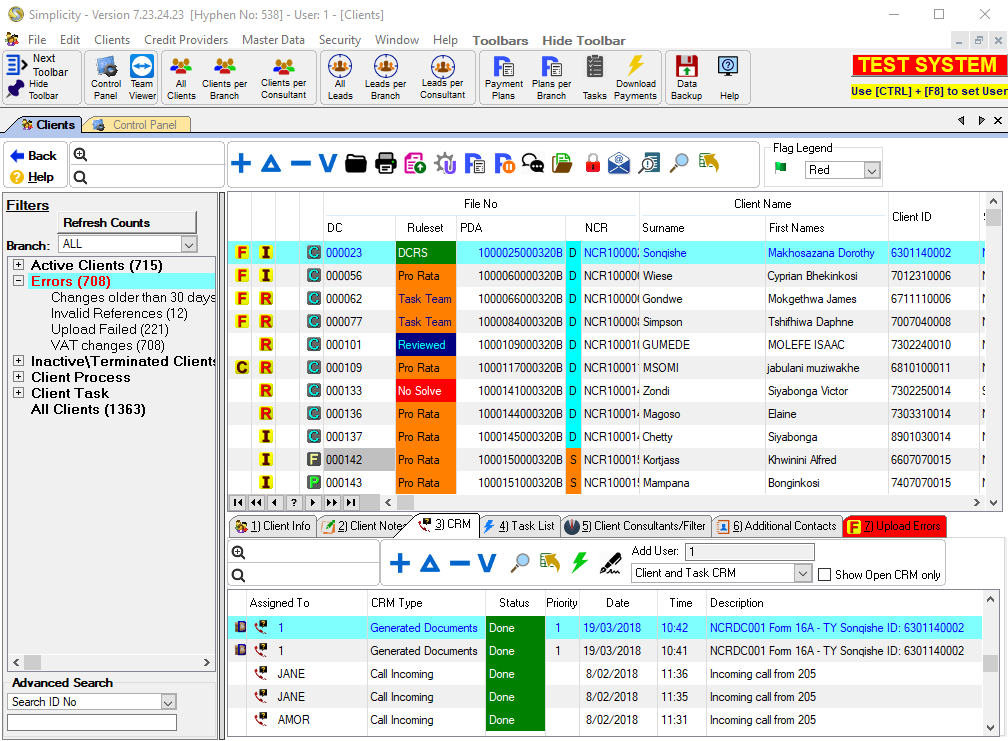
·This allows the user to filter the list of clients according to specific criteria.
·Only one tree can be expanded at a time, if you expand one tree, any other expanded tree will be automatically collapsed.
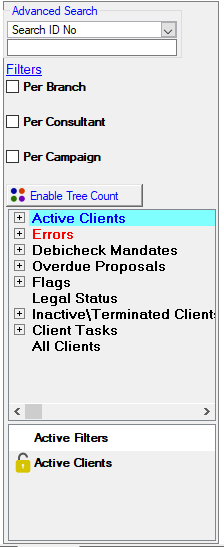
oPer Branch: This feature allows the user to filter the list of clients according to a specific branch (each client can be assigned a branch on the client info window)
oIf security is set on this feature, the following will occur for users on which security is set:
§The feature will be automatically activated but unavailable to the user
§The branch of the consultant to which the user is linked will be selected but unavailable to the user
oSetting security on this feature will effectively limit the available client list for specific Consultants.
oPer Consultant: This feature allows the user to filter the list of clients according to a specific Consultant (each client can be assigned a Consultant on the client info window).
oIf security is set on this feature, the following will occur for users on which security is set:
§The feature will be automatically activated but unavailable to the user
§The Consultant to which the user is linked will be selected but unavailable to the user
oSetting security on this feature will effectively limit the available client list for specific Consultants.
oPer Campaign: This tick box filters the browse according to Campaign.
o
 Enable Tree Count: This displays an amount of all the filters. Enable Tree Count: This displays an amount of all the filters.
oActive Clients: This displays a list of clients either locally active only or active at the PDA.
§Active at Hyphen: This displays a list of clients that are currently active at Hyphen.
§Changes to Upload: This displays a list of clients, filtered by the selected main filter, for which the plans need to be uploaded after a change was made to the client record.
§To Be Terminated: This displays a list of active clients that is marked terminated and that needs to be uploaded.
§Collection Type: This displays a list of all the collection types used.
·Aedo: This displays a list of all clients using Aedo as a collection type.
·Cash: This displays a list of all clients using Cash as a collection type.
·DebiCheck (If Registered): This displays a list of clients, filtered the collection type that was selected for the client.
oMandate Creation Requested: The DebiCheck mandate has been submitted to the bank and Hyphen PDA is waiting for the Consumer to respond to the submitted DebiCheck mandate.
oMandate Amendment Requested: The DebiCheck mandate has been amended and Hyphen PDA is waiting for the Consumer to respond to the amended DebiCheck mandate.
oMandate Accepted: The Consumer accepted the DebiCheck mandate.
oMandate Ignored: The DebiCheck mandate was not responded to.
oMandate Rejected by Consumer: The DebiCheck mandate is rejected by the consumer.
oMandate Rejected due to Validation error: The DebiCheck mandate is rejected by the bank for Validation errors.
oMandate Rejected due to Technical error: The DebiCheck mandate is rejected by the bank for technical errors.
·Debit Order: This displays a list of all clients using a Debit Order as a collection type.
·EFT: This displays a list of all clients using EFT as a collection type.
·Stop Order: This displays a list of all clients using a Stop Order as a collection type.
§Frozen Clients: This displays a list of clients for which the payment plan has been frozen at the PDA.
§Incomplete: This displays a list of clients, filtered by the selected main filter, for which the record is currently on an incomplete status (certain criteria has not yet been fulfilled in order to successfully validate a Universal Rule Set proposal or save the client file and generate a plan).
§Campaign: This displays a list of clients using campaigns.
§New Clients: This displays a list of clients that are active with payment plans that are not uploaded to Hyphen.
·New, 1st period upload: This displays a list of clients, filtered by the selected sub filter, that is new clients and their first period is uploaded.
·New, Ready for Upload: This displays a list of clients, filtered by the selected sub filter, that is new clients and ready to be uploaded to Hyphen.
§Proposal status: This displays a list of clients according to the proposal status selected on the sub filter (provisional, final or none).
·Create: This displays a list of clients, that are active with a Proposal status of "Create".
·Provisional:This displays a list of clients, that are active with a Proposal status of "Provisional".
oCounter Received:This displays a list of clients, that are active with a Proposal status of "Provisional" with at least one obligation has a "Counter Received".
oCounter Accepted:This displays a list of clients, that are active with a Proposal status of "Provisional" with at least one obligation has a "Counter Accepted".
oCounter Rejected:This displays a list of clients, that are active with a Proposal status of "Provisional" with at least one obligation has a "Counter Rejected".
·Final:This displays a list of clients, that are active with a Proposal status of "Final".
oCounter Accepted:This displays a list of clients, that are active with a Proposal status of "Final" with at least one obligation has a "Counter Accepted".
oCounter Rejected:This displays a list of clients, that are active with a Proposal status of "Final" with at least one obligation has a "Counter Rejected".
·No Payment Received in 3rd Month: This displays a list of clients with proposals that have no obligation installments for the third period of the clients's proposal.
§Referred From: This displays a list of clients with referrals.
§Rule Set: This displays a list of clients for which the a proposal rule set has been applied.
·DCRS:This displays a list of clients for which a successful DCRS calculation has been done.
·No Solve:This displays a list of clients of which a proposal does not solve.
·ProRata:This displays a list of clients for which a successful ProRata calculation has been done.
·Revised:This displays a list of clients for which a Revised proposal has been inserted.
·Task Team:This displays a list of clients for which a successful Task Team calculation has been done.
§Status: This displays a list of clients, filtered by the selected statuses.
·Under Consideration:This displays a list of clients with a status of "Under Consideration".
·Accepted:This displays a list of clients with a status of "Accepted".
·Terminated:This displays a list of clients with a status of "Terminated".
·Restructured: This displays a list of clients with a status of "Restructured".
§Uploaded Successfully: This displays a list of clients with Payment Plans that are up to date at Hyphen.
§Validate Passed: This displays a list of clients, filtered by the selected main filter, for which the validation process returned valid creditor reference combinations according to the validation check at the PDA.
·Errors: This displays a list of errors.
§No Future PDA Payments: This displays a list of clients for which no future planned collections have been uploaded to Hyphen.
§Changes older than 30 days: This displays a list of clients for which there was changes older than 30 days made to the client.
§Upload Failed: This displays a list of clients for which the last upload attempt failed.
· Client Already Exists: This displays a list of active clients for which the last Hyphen upload encountered an error and the client already exists at Hyphen
§Invalid Reference: This displays a list of clients, filtered by the selected main filter, for which one or more creditor reference combinations did not pass the validation check at the PDA.
§Payment Suspensions: This displays a list of clients where at least one obligations contains a suspended Hyphen payment.
§Terminated: This displays a list of clients either locally terminated only or terminated.
§DebiCheck Mandate Required: This displays a list of clients where an DebiCheck is required.
·Overdue Proposals: This displays a list of clients with proposal statuses that have not been changed to "Final" for a period of time.
§Create: This displays a list of clients with proposal status on "Create' but have not changed to "Final" in three months.
§Provisional: This displays a list of clients with proposal status on "Provisional but have not changed to "Final" in four months.
·Flags: This displays a list of clients that have at least one flag column marked.
·Legal Status: This displays a list of clients to which a status has been assigned to.
·Inactive\Terminated Clients: This displays a list of clients, filtered by the selected main filter, for which the client records are inactive or terminated.
§Creditor Terminated: This displays a list of creditors that are terminated.
§Deactivated: This displays a list of clients, filtered by the selected main filter, for which the plans have been deactivated.
§Deactivated by PDA: This displays a list of clients, filtered by the selected main filter, for which the plans have been deactivated by the PDA.
§Inactive Only: This displays a list of clients either inactive only or inactive at the PDA.
§Paid Up: This displays a list of terminated clients for which the terminated reason is "all paid up".
§Terminated By hyphen: This displays a list of clients either locally terminated only or terminated by the PDA.
oClient Task: This displays a list of sub-divided phases but only phases that have tasks linked to them will display there.
oAll Clients: This displays a list of clients regardless of their status.
oActive Filter: This feature will allow a user to combine various tree filters
§The tree filter currently applied will be displayed under the Active Filters, that filter can be locked and then further filters added to the list of locked filters.
§e.g.
§1. A user can select the Tree filter "Active Clients" -> "Collection Type" -> "Debicheck", this will display all clients with the collection type "DebiCheck"
§2. The User can then activate the lock on the active filter called "DebiCheck"
§3. The user can then select the tree filter "DebiCheck" -> "Required", this will now display a list of clients who's collection type is "DebiCheck" and have a mandate required.
|
 The following can be found on the Client Browse