Fees
Program Navigation: Simplicity > toolbar > Lead Browse > Lead Dashboard > Fees
|
Navigation: The User Interface > What is in Simplicity > Toolbar > Leads (Browse) > Lead Dashboard > FeesProgram Navigation: Simplicity > toolbar > Lead Browse > Lead Dashboard > Fees |
·This browse allows the user to insert and manage the legal and restructure fees.
·This browse also allows the user to insert adjustments for the fee records.
·This browse also allows the user to insert a legal fee loan.
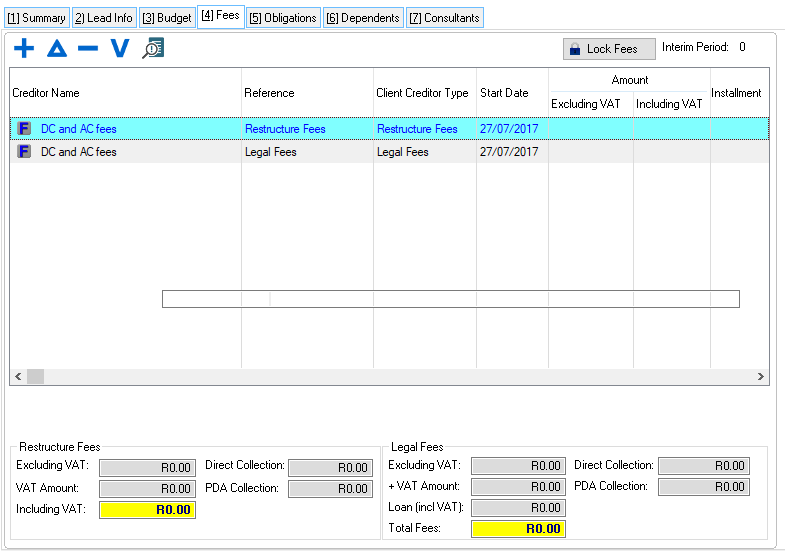
This is a example of the Fees tab
 The following fields are available fees window:
|
·
oThis control allows the user to lock the fees by preventing changes and disabling features that will cause the fees to change.
·Totals: oThese fields display the total restructure and legal fee amounts for the lead's plan. oFee records cannot be edited once the lead has been uploaded to the PDA, only fee adjustments can be inserted.
Restructure Fees: ·Excluding VAT: oThis field displays fee the amount excluding vat.
·VAT Amount: oThis field displays the VAT amount for the fee.
·Including VAT: oThis field displays the fee amount including VAT (The total fee amount).
·Direct Collection: oThis field displays the fee amount that will be collected directly (not through the PDA).
·PDA Collection: oThis field displays the fee amount that will be collected through the PDA.
Legal Fees:
·Excluding VAT: oThis field displays fee the amount excluding VAT (excluding the legal fee loan).
·VAT Amount: oThis field displays the VAT amount for the fee (excluding the legal fee loan).
·Loan (Incl VAT): oThis field displays the legal fee loan amount including the VAT (excluding the legal fee loan).
·Total Fees: oThis field displays the fee amount including VAT (The total fee amount including legal fee loan).
·Direct Collection: oThis field displays the fee amount that will be collected directly (not through the PDA), (excluding the legal fee loan).
·PDA Collection: oThis field displays the fee amount that will be collected through the PDA (excluding the legal fee loan). |

The following forms can be accessed from the Fees windows:
General Features available in this window:
Ø  Insert
Ø  Change
Ø  Delete

Ø Sort