Changing Restructure Fees
oThis form allows the user to insert the proposed restructure fee amount for the lead.
oFee records cannot be edited once the lead has been uploaded to the PDA, only fee adjustments can be inserted.
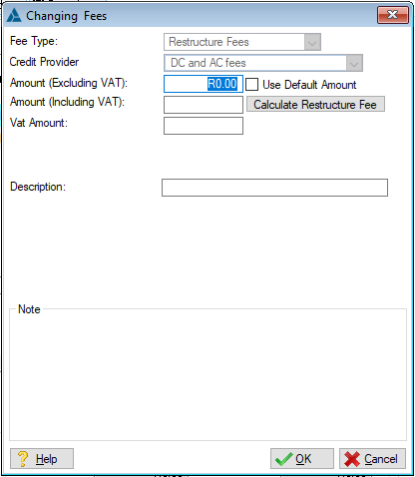
This is an example of the Restructure Fees Form
 The following can be found on the Fees browse:
|
·Fee Type: oDisplays the type of fee the user is editing.
·Credit Provider: oDisplays the creditor to which the restructure fee payments will be made (Can be changed on the Master Fee Table).
·Amount (Excluding VAT): oAllows the user to insert a fee amount excluding the VAT figure, is automatically inserted if the "Amount (Including VAT)" is inserted.
·Use Default amount: oThis check box allows the user to specify whether or not the default fee amount must be used, this is equal to the lead's current affordability + R50 (Excluding VAT), to a maximum of R6050. (excluding VAT), if the affordability of the lead is changed a new default amount is required.
·Amount (Including VAT): oAllows the user to insert a fee amount including the VAT figure, is automatically inserted if the "Amount (Excluding VAT)" is inserted.
·Calculate Restructure Fees: oAllows the user to insert the maximum allowed restructure fee figure by simply clicking on this control.
·VAT Amount: oDisplays the VAT amount for the fee.
·Hold (Stop PDA Collection): oThis check box allows the user to specify whether or not the PDA should collect the restructure fee, this feature will remove the prospective fee amount from the affordability that is uploaded to the PDA for the duration of the fee payments (usually the first 2 periods on the payment plan), can be restricted to the first period only if option is selected in master data.
·Note: o Allows the user to insert a note for the restructure fee record. |
General Features available in this window:
Ø Text Box
Ø OK
Ø Cancel