Legal Fees
|
Navigation: The User Interface > What is in Simplicity > Toolbar > Clients (Browse) > Client Dashboard > Fees > Legal Fees |
oThis form allows the user to insert the proposed legal fee amount for the client.
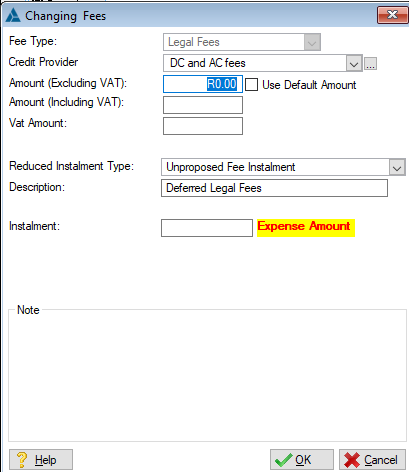
This is an example of the Legal Fees Form
 The following can be found on the Fees browse:
|
·Fee Type: oDisplays the type of fee the user is editing.
·Credit Provider: oAllows the user to insert the creditor to which the Legal fee payments will be made (Can also be changed on the Master Fee Table).
·Amount (Excluding VAT): o Allows the user to insert a fee amount excluding the VAT figure, is automatically inserted if the "Amount (Including VAT)" is inserted.
·Use Default amount: oThis check box allows the user to specify whether or not the default fee amount must be used, the default amount is specified in the Fee Master Table. oDefault amount fees will be disabled when two proposal instances are also disabled when uploaded.
·Amount (Including VAT): oAllows the user to insert a fee amount including the VAT figure, is automatically inserted if the "Amount (Excluding VAT)" is inserted.
·VAT Amount: oDisplays the VAT amount for the fee.
oThis field allows the user to select a reduced instalment for the fees after period three or after the upfront portion paid .
·Description: oThis field allows the user to insert a description for the fees. oThis description will be used as the expense description if the "Reduced Instalment After Period 3" feature is used. o If a description is not inserted, "Legal Fees" will be used as the description.
·Note: oAllows the user to insert a note for the Legal fee record.
|
General Features available in this window:
Ø Text Box
Ø OK
Ø Cancel