Obligations
Program Navigation: Simplicity > toolbar > Client Browse > Client Dashboard > Obligations
|
Navigation: The User Interface > What is in Simplicity > Toolbar > Clients (Browse) > Client Dashboard > ObligationsProgram Navigation: Simplicity > toolbar > Client Browse > Client Dashboard > Obligations |
·This browse allows the user to insert/manage all obligations for the selected client (such as the COB details).
·Once all relevant obligation information has been inserted, a proposal will be generated automatically by the program.
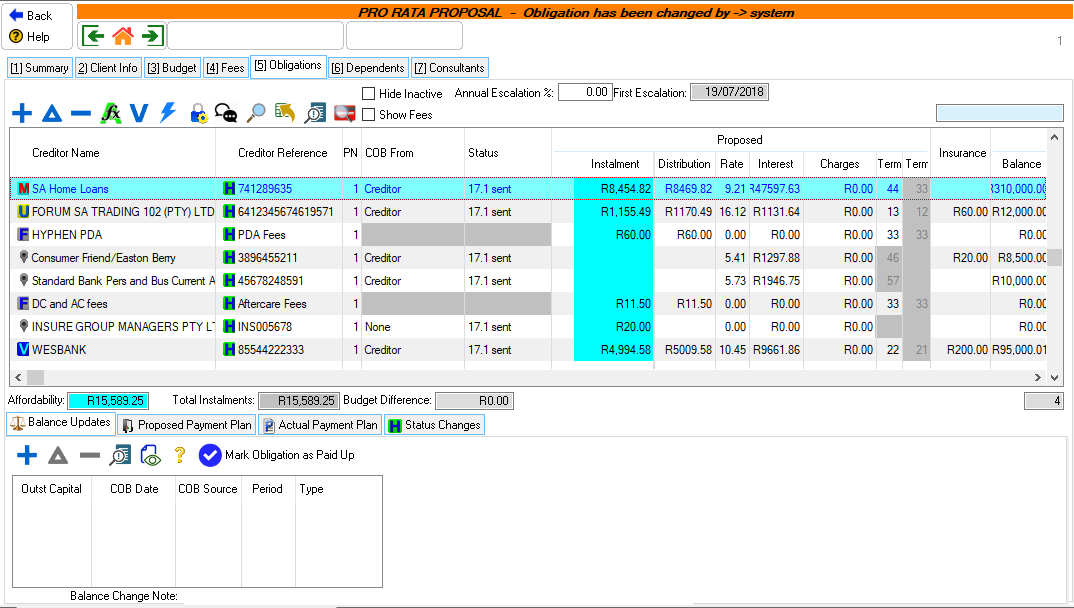
This is an example of the obligations tab
|
·PN: oThis column displays the proposal instance number to which the obligation belongs.
·Reckless Credit: oThis column displays the possible reckless credit obligations based on the Inception date and the difference between the sum of the total original instalments and the client's actual PDA collection.
|
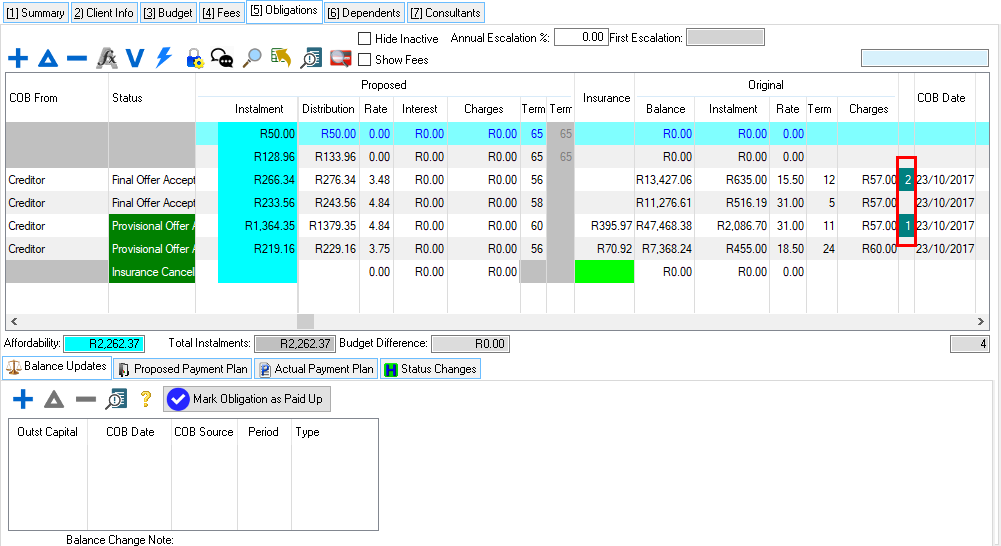
 The following controls can be found on the Obligations browse:
|
·
oThis control allows the user to view a list of calculation options. oCalculate proposal:This option allows the user to calculate the proposal of the client.
·
oThis option allows the user to unlock or lock a certain obligation or all obligations.
o
o
o
o
·Hide Inactive: oThis option allows the user to hide or un-hide inactive or cancelled obligations.
·Show Fees: oThis option allows the user to show or hide the Legal Fee and Restructure Fee records.
·Rule set: (Not applicable to new client files) oThis indicates the type of calculation method that is being used to generate the client's proposal. oSee "Search For a Solve" for details on how to make use of the pro-rata distribution calculation in the event that a no solve situation is reached oOne "Universal" rule set has now been created in the following way: § The Universal rule are used as a base calculation method by which the proposal can be solved. § All the features available in the now discontinued pro-rata rule set have been incorporated into this one "Universal" rule set. ·Annual Escalation: oThis field allows the user to insert the percentage that will increase the client's affordability.
·First Escalation: oThis field allows the user to view the month on which the client's affordability will increase for the first time.
oThis browse allows the user to view all the history of status changes that have been made on the selected obligation. |


|
o This window allows the Administrator to insert additional security on certain features. oThis will allow certain users to have access to certain features on the (*Subject*) browse. oThe security can be set by pressing Ctrl + F8 on the keyboard, this will open a browse where the Administrator can set the security for different features.
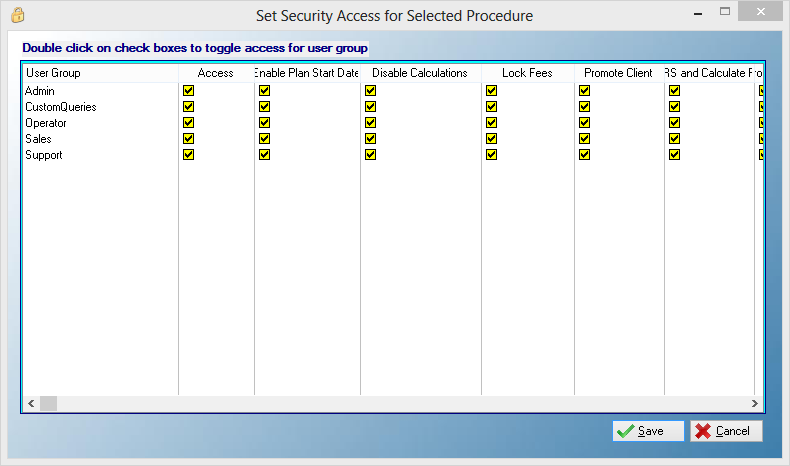
This is an example of the Set Security Browse
oOther security can also be set by clicking on the Lock/Unlock obligations control, this control will lock the fees by preventing changes and disabling features that cause obligations to change.
This is an example of the Lock/Unlock obligations Control o
o
o
o
This is an example of the Lock/Unlock obligations Control |