Balance Updates
|
Navigation: The User Interface > What is in Simplicity > Toolbar > Clients (Browse) > Client Dashboard > Obligations > Balance Updates |
oThis browse allows the user to insert a balance update for the selected obligation, balance updates affect the Payment Plan only.
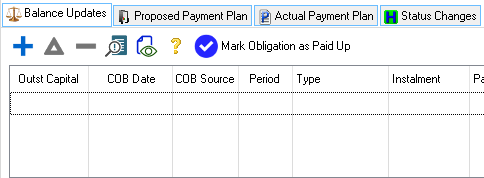
This is an example of the Balance Updates browse
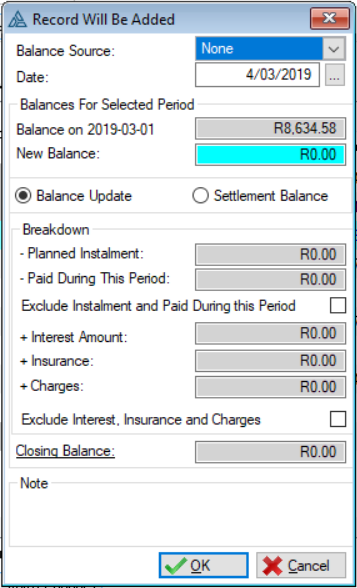
This is an example of the Balance Updates Form
 The following can be found on the Balance update form and browse:
|
·Balance Source: oThis list will allow the user to select the source from where the balance change came from. oNone: This is a default when inserting a balance update, one of the other sources must be selected in order to save this form. oClient oCredit Provider oCredit Bureau
·Date: o This field allows the user to select the date on the payment plan for which the change must be made. oThis will determine the period in which the balance update will occur.
·Balance On: oThis field will display the opening balance of the of the month inserted in the "date" field.
·New Balance: (Applicable only if the "Balance Update" option is selected). o This field will allow the user to insert a new opening balance for the selected month.
·Settlement Balance:(Applicable only if the "Settlement Balance" option is selected.) o This field will allow the user to insert an amount to be paid in order to settle the account.
Breakdown: (Applicable if the "Balance Update" option is selected.)
o- Planned Instalment: §This field will display the planned distribution amount for the selected month §This will only display a figure if no payment has been made in this month. §This figure will be subtracted from the new balance inserted.
o- Paid during this period: §This field will display the actual payment amount that was paid by the PDA in the selected month. §This figure will be subtracted from the new balance inserted.
oExclude Instalment and Paid During this period: §This check box will allow the user to exclude the planned installment or the actual amount that was paid by the PDA from the new balance calculation. §These figures will not be subtracted from the new balance amount.
o+ Interest Amount: §This field will display the calculated interest for this selected month. §This figure will be added to the new balance inserted. o+ Insurance: §This field will display the linked insurance for this selected month. § This figure will be added to the new balance inserted. o+ Charges: §This field will display the proposed charges for this selected month. §This figure will be added to the new balance inserted.
oExclude interest, Insurance and Charges: §This check box will allow the user to exclude the interest, insurance and charges amount form the new balance calculation. §These figures will not be added to the new closing balance amount.
·Closing Balance: oThis field will display the new closing balance for the selected month.
·Note: oAllows a user to insert a note for a specific balance update.
|
General Features available in this window
Ø  Insert
Ø  Change
Ø  Delete

Ø Sort
Ø OK
Ø Cancel