Proposal Sandbox
|
Navigation: The User Interface > What is in Simplicity > Toolbar > Leads (Browse) > Lead Dashboard > Obligations > Proposal Sandbox |
oThe Search For a Solve Feature allows the user to quickly make changes to the instalments and interest rates of the client's obligations in order to find a solve for the client's proposal.
oA Pro-rata calculation is done automatically if the proposal does not solve on the Universal.
oOnce a solve is found, either Universal or Pro-rata, and the save button is pressed, the client's affordability will be locked on the new figure, the user can then adjust the budget in order to match this new figure.
o
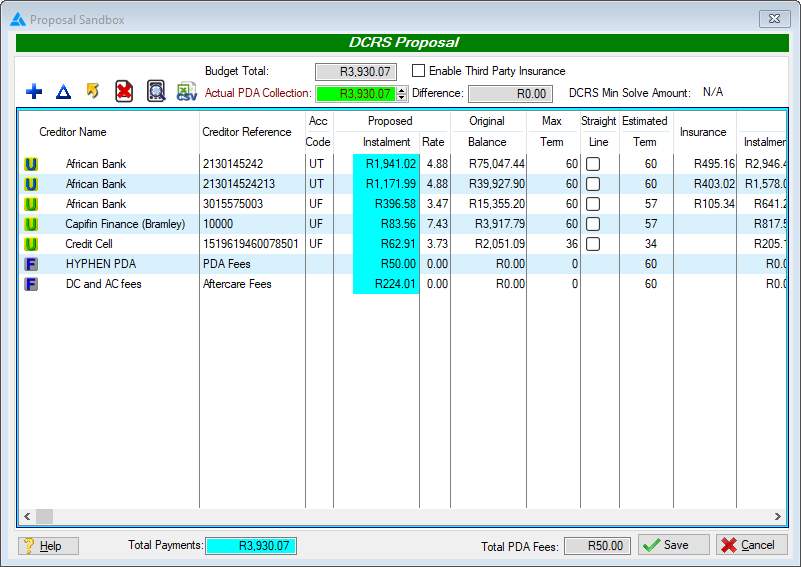
An example of the Search For a Solve window with a proposal that solves on the Task Team rule set
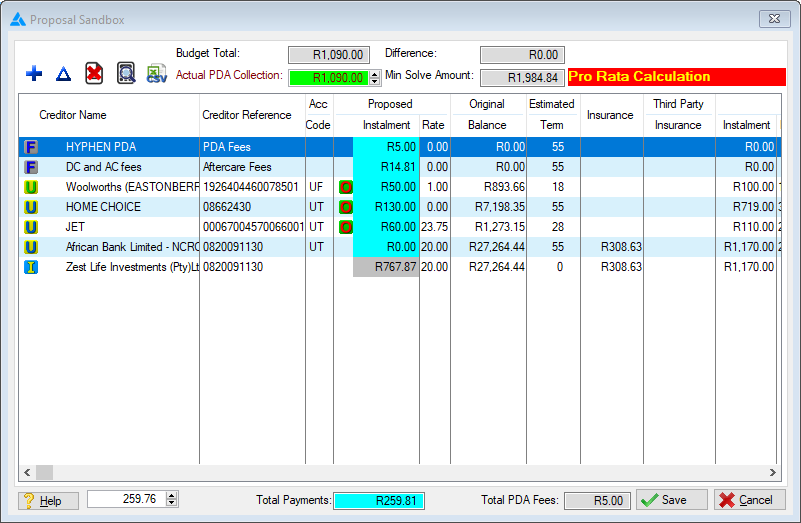
An example of the Search For a Solve window with a proposal that has been calculated Pro-rata
 The following can be found on the Search for Solve browse:
|
·
oAllows the user to make changes to and lock the instalment and/or interest rate of the selected obligation.
·
oThis control allows the user to do the following: oClear All Overrides - Clears the overrides of all the obligations oClear Instalment Override - Clears the overrides of the selected obligation
·
o This control allows the user to do the following: oUse Original Interest - Inserts the original interest rates into the proposed interest rate field. oUse Account Type Formula - Calculates the proposed instalment according to the rule specified in the NCA account type master table of the corresponding account type.
·
oAllows the user to export the current proposal to an excel spreadsheet.
·Affordability: oThis field displays the leads original/current affordability figure.
·Test Affordability: oAllows the user to edit the affordability being used for the "Search for a Solve" feature. oIf the test affordability in this window is altered and then saved, the lead's affordability will then be locked on the changed amount, allowing the user to make adjustments to the lead's budget in order to match the new locked affordability, the affordability will be unlocked when the current affordability matches the new one.
·Difference: oThis field displays the difference between the original/current affordability and the test affordability.
·
oThis will inform the user that Universal are being used to calculate the proposal.
·
oThis will inform the user that Pro Rata Rules are being used to calculate the proposal.
·Total Payments: oThis field displays the total for the proposed payments.
·DCRS Overridden: oThis field displays the total for the proposed payments. |




General Features available in this window:
Ø  Change
Ø Spin Box
Ø Sort
Ø Save
Ø Cancel