Fee Adjustments
|
Navigation: The User Interface > What is in Simplicity > Toolbar > Clients (Browse) > Client Dashboard > Fees > Fee Adjustments |
·This form allows the user to insert a fee adjustment amount for the selected proposed Fee record by which the total planned fee figure will increase or decrease.
·Fee Adjustments affect the payment plan only.
·Fee adjustments can only be added once the client has been uploaded to the PDA.
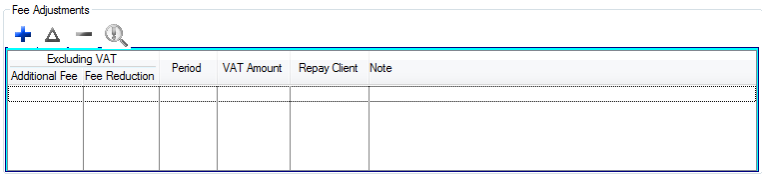
This is an example of the fee adjustment browse
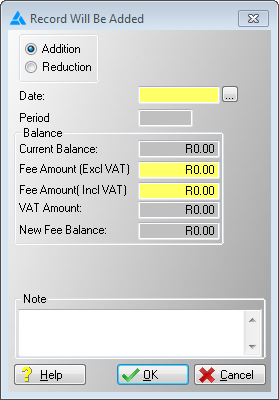
This is an example of the fee adjustment form
 The following can be found on the Fees adjustment form:
|
·Addition: oThis radio control allows the user to determine the nature of the fee adjustment, this particular option will cause the adjustment to increase the total planned fee amount.
·Reduction: oThis radio control allows the user to determine the nature of the fee adjustment, this particular option will cause the adjustment to decrease the total planned fee amount.
·Date: oThis option allows the user to insert the date for the fee adjustment, effectively determining the period to which the fee adjustment will apply.
·Period: oDisplays the period to which the fee adjustment will apply.
·Current Balance: oThis field displays the current outstanding balance of the fee according to the plan.
·Fee Amount (Excl VAT): oAllows the user to insert a fee adjustment amount excluding the VAT figure, is automatically inserted if the "Amount (Including VAT)" is inserted.
·Fee Amount (Incl Vat): oAllows the user to insert a fee adjustment amount including the VAT figure, is automatically inserted if the "Amount (Excluding VAT)" is inserted.
·VAT Amount: oDisplays the VAT amount for the fee adjustment.
·New Fee Balance: oDisplays the projected outstanding fee balance after the fee adjustment has been added.
·Note: oAllows the user to insert a note for the Fee Adjustment record. |
General Features available in this window:
Ø  Insert
Ø  Change
Ø  Delete
Ø Calendar
Ø Text Box
Ø OK
Ø Cancel