Obligations
Program Navigation: Simplicity > toolbar > Leads Browse > Lead Dashboard > Obligations
|
Navigation: The User Interface > What is in Simplicity > Toolbar > Leads (Browse) > Lead Dashboard > ObligationsProgram Navigation: Simplicity > toolbar > Leads Browse > Lead Dashboard > Obligations |
·This browse allows the user to insert/manage all obligations for the selected lead (such as the COB details).
·Once all relevant obligation information has been inserted, a proposal will be generated automatically by the program.
·Creditor statuses can also be changed in order to perform Universal Rule Set validations and/or to mark certain creditors as "Paid Up" when no more payments are to be made.
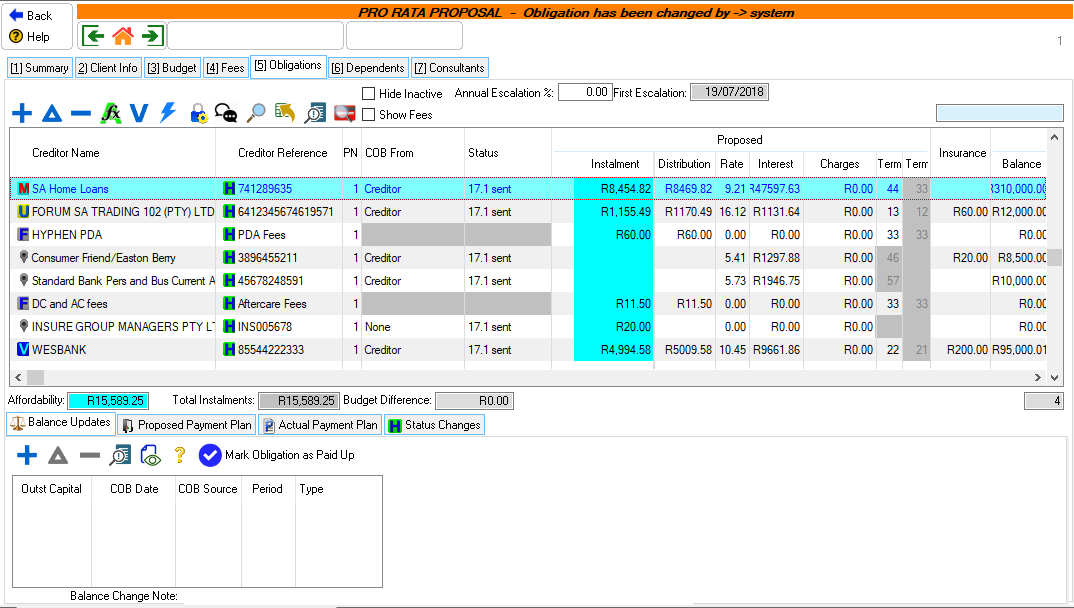
This is an example of the obligations tab
 The following controls can be found on the Obligations browse:
|
·
oThis will calculate the proposed instalment according to the rule specified in the NCA account type master table of the corresponding account type.
·
oThis control allows the user to view a list of calculation options.
oCalculate Proposal: This option allows the user to re-calculate the proposal, affecting the proposed figures of all unlocked obligations. oReset Interest Rate: This option allows the user to reset all the proposed interest rates to the original interest rates and recalculate. oShow proposed payment plan: This option allows the user view the proposed payment plan in a spreadsheet. oCalculate Proposal: This option allows the user to calculate the proposal. oReset Interest Rate: This option allows the user to reset all the original interest rates and recalculate. oShow proposed payment plan: This option allows the user view the proposed payment plan in a spreadsheet.
·
oThis option allows the user to unlock or lock a certain obligation or all obligations.
o
o
o
o
·Hide Inactive: oThis option allows the user to hide or un-hide inactive or cancelled obligations.
·Show Fees: oThis option allows the user to show or hide the Legal Fee and Restructure Fee records.
·Annual Escalation: oThis field allows the user to insert the percentage that will increase the leads affordability.
·First Escalation: oThis field allows the user to view the month on which the lead's affordability will increase for the first time.
·Rule Set: oThis option allows the user to select a certain rule set with which to calculate the proposal. ·Universal Rule Set: This option allows the user to calculate the proposal according to the Debt Counseling Rule system.
·Status Changes: oThis browse allows the user to view all the history of status changes that have been made on the selected obligation. |


