Unproposed PDA-Paid Account
|
Navigation: The User Interface > What is in Simplicity > Toolbar > Clients (Browse) > Client Dashboard > Obligations > Unproposed PDA-Paid Account |
·This feature will allow the user to insert an "Unproposed PDA-Paid Account" which adds an excluded pda payment account through a simplified version of the Obligation form.
·This also includes an outstanding balance that can now be used to determine the terms.
·This feature is not an industry standard.
·This feature can be used as a method of settling various fees and/or accounts (eg. Reckless Lending Loan and Insurance).
·Each un-proposed obligation will add an expense to the client's budget.
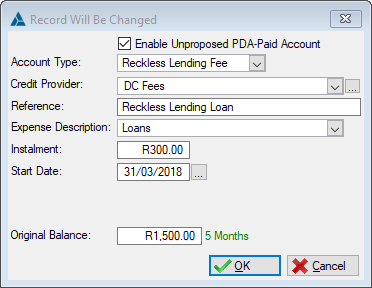
This is an example of the Unproposed PDA - Paid Account
 The following can be found on the Unproposed Obligation Form:
|
·Enable Unproposed PDA-Paid Account: oRemoving this check will revert the account to an excluded obligation.
·Account Type: oAllows the user to select the type of account for this record (eg. Insurance or Reckless Lending Loan ). §Reckless Lending Loan - The sum of the original balance and the reckless lending amount on the fee form can not exceed R 1500.00.
·Credit Provider: oThis field allows the user to insert a credit provider for the selected obligation (Payments will be made to this creditor).
·Reference: oAllows the user to insert a reference number used when making payments to the selected creditor.
·Expense Description: oAllows the user to select the expense description for the excluded PDA payment. §The expense description selected will be the name of the expense inserted on the client's budget which in turn will also display on the budget section of the Proposal Report. §The list of the expense descriptions available can be viewed and updated on the Master Data - Budget Master Table.
·Instalment: oAllows the user to insert the instalment for the excluded PDA payment, this will be the amount paid to the creditor monthly. §This instalment will also be the expense amount on the client's budget which in turn will also display on the budget section of the Proposal Report.
·Start Date: oThis field allows the user to insert the date from which the excluded PDA payment will start. §This will determine the first instalment date on the Actual Payment Plan.
·Expire Date: oThis field allows the user to insert the date on which the excluded PDA payment will expire. §This will determine the last instalment date on the Actual Payment Plan regardless of any amount inserted in the Original Balance field.
·Interest Rate: o Allows the user to insert the interest rate for the excluded PDA payment. §The interest rate is only applicable when using an Original Balance.
·Original Balance: o Allows the user to insert the Original Balance for the excluded PDA payment. §This can used instead of the expiry date to determine the number of terms in which to settle the account. |