DDDThird Party Cover
|
Navigation: The User Interface > What is in Simplicity > Toolbar > Clients (Browse) > Client Dashboard > Obligations > Third Party Cover |
·This feature will allow the user to insert "Third Party Cover" this will allow adds an excluded pda payment account through a simplified interface,
·This form also contains a cover type option.
·This feature is not an industry standard.
·The fields in the Third Party Cover form is the same as the fields contained in the obligation form except for the Original Balance field.
·This form is a simplified version of the Obligation form.
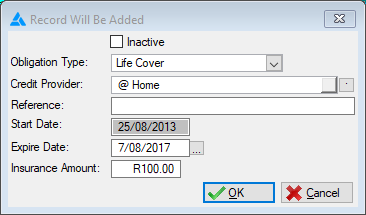
This is an example of the Third Party Cover Form
 The following can be found on the Third Party Form:
|
·Obligation Type: oThis field allows the user to insert the type of cover the client will be using.
·Credit Provider: oThis field allows the user to insert a credit provider for the selected obligation (Payments will be made to this creditor).
·Reference: oAllows the user to insert a reference number used when making payments to the selected creditor.
·Start Date: oThis field allows the user to insert the date from which the cover will start.
·Expire Date: o Allows the user to insert the date on which this account will expire.
·Insurance Amounts: o Allows the user to insert the amount for the cover. |