Tickets
|
Navigation: The User Interface > What is in Simplicity > Toolbar > Tickets |
·This browse gives the user an overview of the selected communication record, displaying information such as the body the communication, the correspondent recipients of the attached documents, the attached documents themselves as well as any communication errors.
·This window allows a user to add, execute and maintain the communications records.
·The layout of the communication window will depend on the communication type selected.
·When inserting a communication the communication parameters window will allow the user to select a communication type and template.
·The communications records listed can be filtered by the various methods such as tree filter, per user and per client filter.
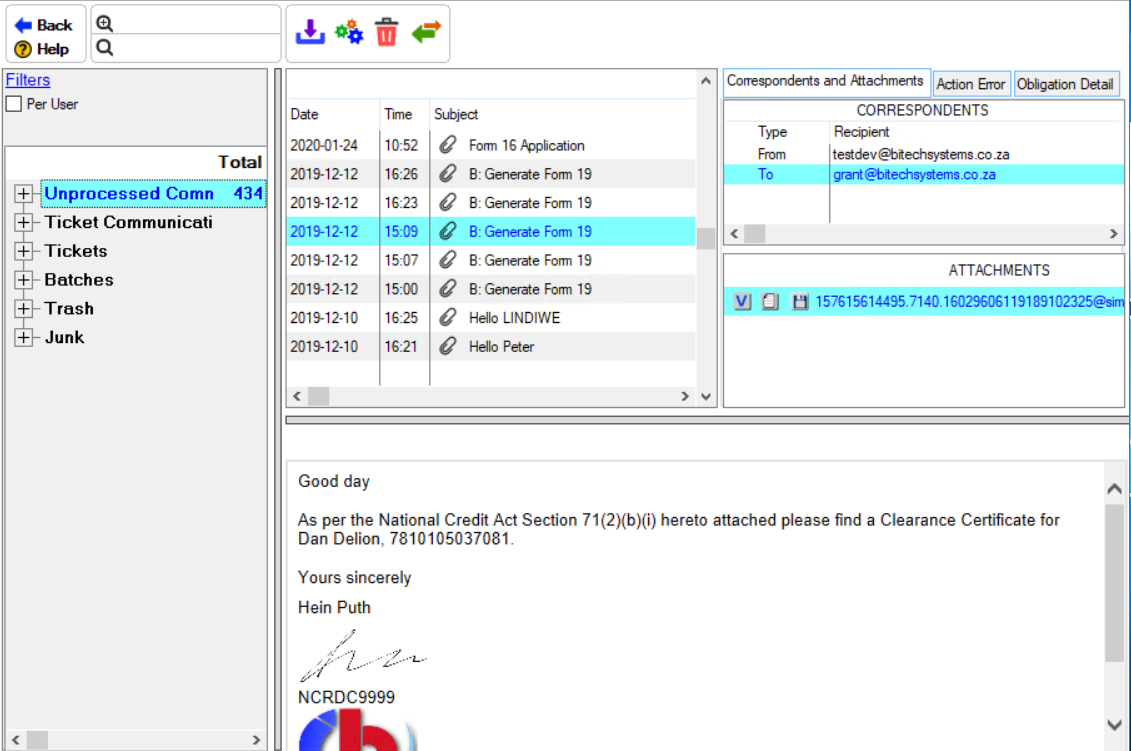
This is an example of the Communications browse
Click on the link to expand the topic:
 The Following can be found on the Tickets Browse
|
·
oAllows the user to download any new incoming emails.
·
·Allows the user to mark an email as read.
·
oAllows the user to mark an email as trash, this will move the email to the trash bin but it can be undone and restored.
·
oThis will display the process buttons next to the email.
·
oThis control will allow the user to preview the selected document or attachment.
·
oThis control allows the user to print the document attached to the ticket.
·
oThis control allows the user to save the document attached to the ticket. |


