Client Due Tasks
|
Navigation: The User Interface > What is in Simplicity > Toolbar > Tasks (Browse) > Task Reports > Client Due Tasks |
oThis window allows the user to print a report displaying the client's due tasks.
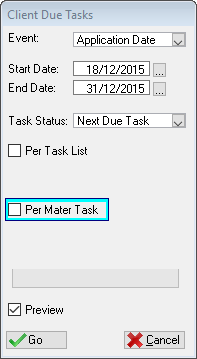
This is an example of the Client Due Tasks Window
 The following features can be found on the Due Tasks Window:
|
·Event: oThis list allows the user to select the event (Application date, First Payment Date, due Date) to which the date range should apply.
·Start Date: oWill filter all the tasks by displaying all tasks for clients who's event (Application date, First Payment Date, due Date) follow the inserted date.
·End Date: oWill filter all the tasks by displaying all tasks for clients who's event (Application date, First Payment Date, due Date) precede the inserted date.
·Task Status: oAllows the user to filter the report according to the status (Next Due, No Tasks Done and All Tasks Done) of the tasks.
·Per Task List: oThis check box allows the user to select the tasks per the task list.
·Per Mater Task List: oAllows the user to filter the report according to a specific Master Task. |