Call Outgoing
|
Navigation: The User Interface > What is in Simplicity > Toolbar > Tickets > Call Outgoing |
oThe Outgoing calls CRM type is used when creating a comm record to schedule an outgoing call to a client.
oThe body of the CRM record can be used to construct a script or list of sales/conversation topics to be covered in the call.
oTemplates can be used if available in order to expedite the CRM record capturing process.
oIn addition to the body of the CRM record, the user can also add notes and documents/files to the CRM record, the record can also be assigned to a specific user.
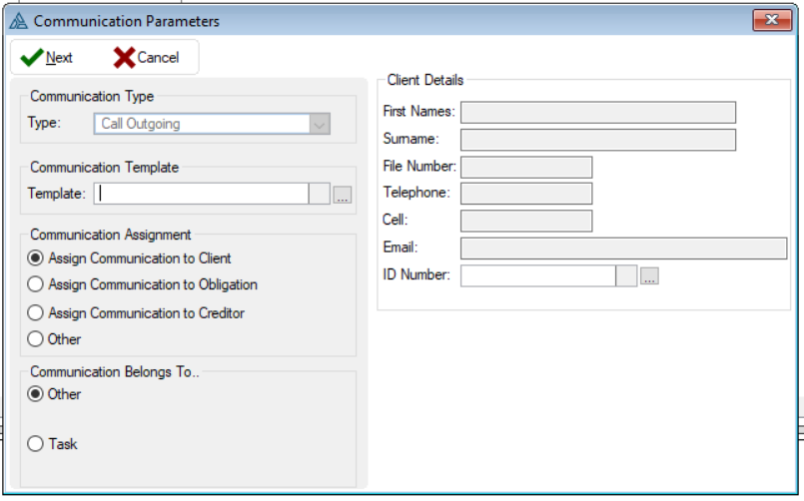
This is an example of the Outgoing Calls form
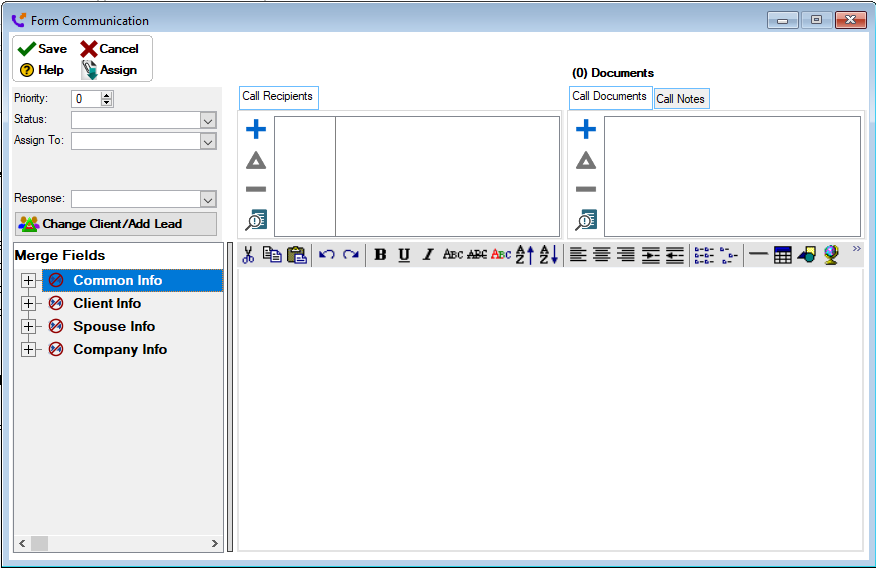
 The following can be found on the Outgoing Calls Form:
|
·Type: oThis will display the type of communication that will be inserted.
·Assign Communication To Client: oAllows the user to assign the communication record to a client.
·Assign Communication To Obligation: oAllows the user to assign the communication record to an obligation.
·Assign Communication To Creditor: oAllows the user to assign the communication record to a creditor.
·Other: oAllows the user to assign the communication record to any other communication.
·First Names: oDisplays the first names of the selected client.
·Surname: oDisplays the surname of the selected client.
·File number: oDisplays the database file number of the selected client.
·Telephone: oDisplays the home number of the selected client.
·Cell: oDisplays the Cell number of the selected client:
·Email: oDisplays the email address of the selected client.
·ID Number: oAllows the user to select the client for which to create the CRM record (Automatically inserted if CRM record is added from the Client Browse CRM control). be populated with the client's information). |