COB Information
|
Navigation: The User Interface > What is in Simplicity > Toolbar > Leads (Browse) > Lead Dashboard > Obligations > Obligation Form > COB Information |
oThis form allows the user to insert the account information of the obligation such as the COB details.
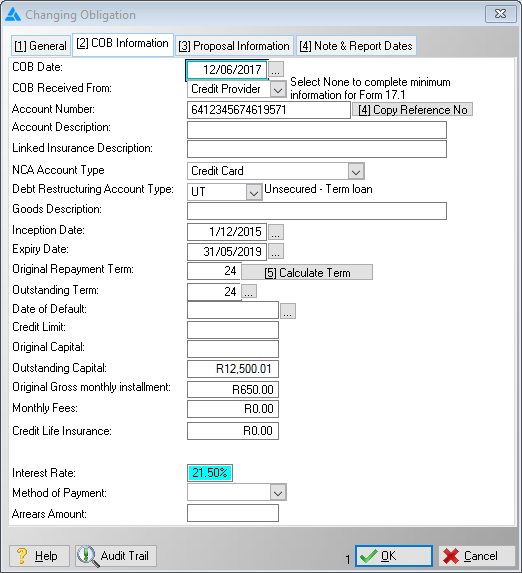
This is an example of the COB tab
 The following can be found on the Accounts Tab:
|
COB Date: oAllows the user to insert the Date on which the COB was received, must be newer than 3 months in order to perform a Universal Rule Set validation.
·COB Received From: oAllows the user to insert the source of the COB.
oNone: Allows user to insert the minimum possible number of fields, cannot be used when attempting a Universal Rule Set validation. oClient, Credit Provider, Credit Bureau: These options make a few additional fields required, must be used in order to perform a Universal Rule Set validation.
·Account Number: oAllows the user to insert the account number/reference number for the obligation, must be inserted in order to perform a Universal Rule Set validation, is also used on various DC reports.
·Copy Reference No: oThis control will copy the reference number from the general form into the account number field.
·Account description: oAllows the user to insert a description for the selected obligation record.
·Linked Insurance Description: oAllows the user to insert a description for the obligation's linked insurance (if applicable).
·NCA Account Type: oThis field allows the user to select an NCA account type for the obligation (e.g. Bond, Credit Card, Personal Loan and Vehicle).
·Debt Restructuring Account type: oAllows the user to select a debt restructuring account type for the obligation record, this must be selected in order to perform a Universal Rule Set validation, each option affects the proposal calculation differently:
oPBL:Pension Backed Loan, typically used for home loans. oSCV: Secured Commercial Vehicle, typically used for commercial vehicle finance. oSM: Secured Mortgage, typically used for home loans. oSPV:Secured Private Vehicle, typically used for Private Vehicle finance. oUF: Unsecured Facility, typically used for clothing accounts or personal loans. oUT:Unsecured Term Loan, typically used for credit cards.
·Goods Description: oAllows the user to insert details on the products bought through this account.
·Inception Date: oAllows the user to insert the date on which this account was opened, must be inserted in order to perform a Universal Rule Set validation.
·Expiry Date: o Allows the user to insert the date on which this account will expire, must be inserted in order to perform a Universal Rule Set validation.
·Original Repayment Term: oAllows the user to insert the original number of payment terms indicated on the COB, can also be calculated using the "Calculate Terms", "Calculate UF Data" or "Calculate UT Data" features.
·Calculate UT Data: oThis feature will automatically insert the Original Repayment Term and Outstanding Term, based on a calculation involving the outstanding capital amount. o12 Months for outstanding capital up to R3600, 24 Months for outstanding capital greater than R3600.
·Calculate UF Data: oThis feature will automatically insert the Original Repayment Term and Outstanding Term, based on a calculation involving the outstanding capital amount. o12 Months for outstanding capital up to R3600, 24 Months for outstanding capital greater than R3600.
·Outstanding Term: oAllows the user to insert the number of payment terms currently outstanding, can also be calculated using the "Calculate Terms", "Calculate UF Data" or "Calculate UT Data" features.
·Calculate Terms: oThis feature calculates and automatically inserts the Original Repayment Term and Outstanding Term.
·Calculate Original Repayment Term using Inception and Expiry Dates: oWill automatically insert the Original Repayment Term based on a calculation involving the Inception and Expiry Dates.
·Calculate Outstanding Term using Balance and Rate: o Will automatically insert the Outstanding Term based on a calculation involving the Outstanding Capital and Interest Rate.
·Date Of Default: oAllows the user to insert the date on which the client has defaulted.
·Credit Limit: oAllows the user to insert the credit limit of the obligation.
·Original Capital: oAllows the user to insert the original capital for the obligation, this must be inserted in order to perform a Universal Rule Set validation.
·Outstanding Capital: oAllows the user to insert the outstanding capital for the obligation, this must be inserted in order to perform a Universal Rule Set validation.
·Original gross Monthly Instalment: oAllows the user to insert the Original gross Monthly Instalment for the obligation, can also be automatically inserted using the Calculate UT/UF Data feature, This must be inserted in order to perform a Universal Rule Set validation.
·Monthly Fees: oAllows the user to insert any monthly fees associated with the obligation
oAllows the user to insert any insurance premiums linked to the obligation, this figure will form part of the proposed instalment and will be subtracted from the amount paid towards the outstanding balance. oThe insurance amount cannot be greater than the available amount.
·Interest rate: o Allows the user to insert the interest rate of the obligation record.
·Method of Payment: oAllows the user to insert the method of payment used by the client to pay this account.
·Arrears Amount: oAllows the user to insert the client's arrears amount for the obligation. |
General Features available in this window:
Ø Look Up
Ø Calendar