Master Tasks
Program Navigation: Simplicity > toolbar Frame > Master Data >Master Tasks
|
Navigation: The User Interface > What is in Simplicity > Main Menu > Master Data > Master TasksProgram Navigation: Simplicity > toolbar Frame > Master Data >Master Tasks |
·This is a customizable list of jobs that need to be performed on a client's file and is generally used as a basic company work flow outline for users to follow.
·This browse allows a user to insert a list of tasks that will be automatically added to a client's task list if pre-determined criteria are met.
·Each task can be set to generate automatically for a client when either a previous task is completed or if a specific date (such as the client's application date or capture date) falls within 100 days of the current date.
·Tasks can be assigned to a Client phase.
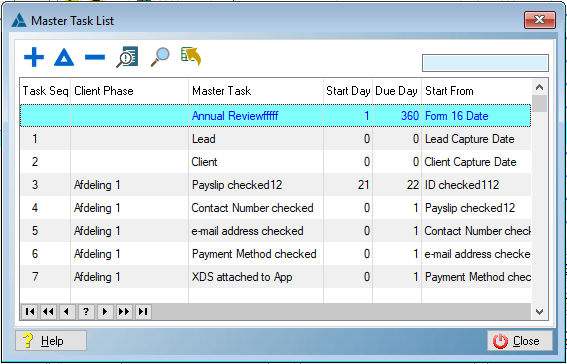
This is an example of the Master Tasks browse
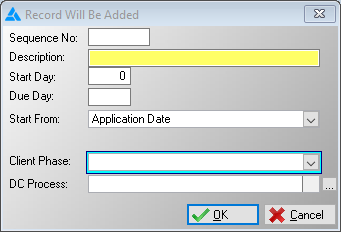
This is an example of the Master Tasks form
 The following fields can be found in the Master task list form:
|
·Sequence Number: oAllows the user to insert a sequence in which the tasks will appear on a client's task list.
·Description: oThis field allows the user to insert the description for the task.
·Start day: oDetermines the Start date of the inserted client task by allowing the user to insert the number of work days after the "Start From" field the task should start.
·Due day: oDetermines the Due date of the inserted client task by allowing the user to insert the number of work days after the "Start From" field the task should be due.
·Due Time: oDetermines the Due Time of the inserted client task.
·Start from: oAllows the user to insert a report date, event or task after which the task must start.
·Application Date: oWill insert the task if the client's Application date falls within 100 days of the current date.
·Form 16 Date: oWill insert the task if the client's Form 16 Signed date falls within 100 days of the current date.
·From First 17.1 Date: oWill insert the task if the client's oldest Form 17.1 date (Located on an obligation's "Note & Report Dates" tab) falls within 100 days of the current date.
·After Another Task: oAllows the user to select another master task of which the client task must be completed in order for the task to be inserted in the client's tasks list.
·Client Capture Date: oWill insert the task if the client's Capture date falls within 100 days of the current date.
·Lead Capture Date: oWill insert the task if the lead's Capture date falls within 100 days of the current date.
oAllows the user to select a process to which the task must be linked. |
General Features available in this window:
Ø  Insert
Ø  Change
Ø  Delete

Ø  QBE
QBE
Ø  Send to
Ø Browse
Ø Forms
Ø Sort