DC Process
|
Navigation: The User Interface > What is in Simplicity > Main Menu > Master Data > Master Tasks > DC Process |
oThe DC Process allows the user to link a certain task with a certain DC process.
oWhen tasks of a specific process is completed, the client moves to the next process.
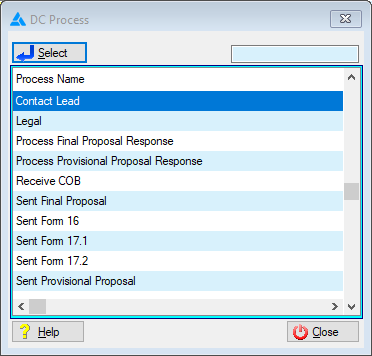
This is an example of the DC Process Browse
 The following fields can be found in the DC Process browse:
|
·Contact Lead: o The lead has been contacted and the has applied for Debt Counselling.
·Legal: o All relevant documents have been sent to the legal representative, awaiting an order granted.
·Process Final Proposal Response: oResponses on the final proposal have been received from the credit providers.
·Receive COB: oThe COBs have been received from the credit providers and processed, alternatively the details obtained from the client or credit bureau will be used.
·Sent Final Proposal: oThe final proposal has been generated and sent to the credit providers, awaiting a response from credit providers.
·Sent Form 16: o The form 16 has been sent to the client, awaiting the signed form.
·Sent Form 17.1: oThe form 17.1 has been sent to the credit providers.
·Sent Form 17.2: oThe form 17.2 has been sent to the credit providers, this step may include the 17.1 Reminder.
·Sent Provisional Proposal: oThe provisional proposal has been generated and sent to the credit providers, awaiting a response from credit providers. |