Merge Document Types
Program Navigation: Simplicity > toolbar Frame > Master Data > Document Types > Merge Document Types
|
Navigation: The User Interface > What is in Simplicity > Main Menu > Master Data > Document Types > Merge Document TypesProgram Navigation: Simplicity > toolbar Frame > Master Data > Document Types > Merge Document Types |
oThis window allows the user to merge certain documents types.
oSelected documents on the "Target Note Type" list will be merged into the selected Documents "Source Note Type" list.
oThe document type for all documents on the database linked to the target note type will be changed to the source note type.
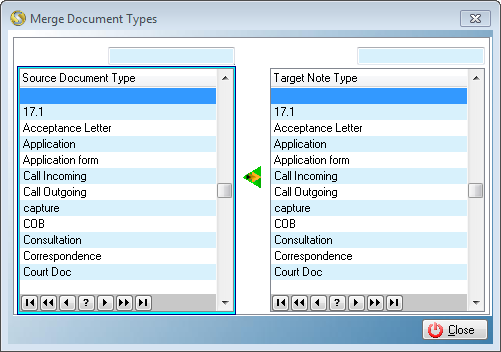
This is an example of the Merger Document Types browse
The following control can be found on the merge document type's window:
 Merge Document Types:
oThis control allows the user to merge the selected target note type with the selected source document type (the source document type will be reserved).
General Features available in this window:
Ø Browse
Ø Sort