General
|
Navigation: The User Interface > What is in Simplicity > Toolbar > Clients (Browse) > Client Dashboard > Obligations > Obligation Form > General |
oThis form allows the user to insert basic obligation details such as the account type and reference number.
oThis form allows the user to change the status of the credit provider.
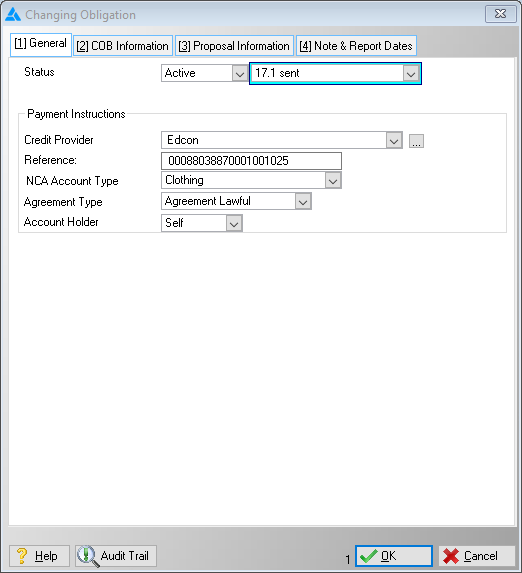
This is an example of the general tab
 The following can be found on the General Tab:
|
oThis field allows the user to select a status for the obligation.
oActive: The creditor will appear on the proposal and plan as expected. oHold: The creditor will appear on the proposal but not on the plan. oCancelled: The creditor will not appear on the proposal or the plan.
·A few other statuses that affect the client's proposal:
oCancelled: The creditor will not appear on the proposal or the plan. oFinal Offer Accepted: Used to perform a Final Universal Rule Set Validation oPaid Up: Used to mark the obligation as paid up which will insert a balance change of 0 for the selected Obligation, removing the obligation from the plan only. oProvisional Offer Accepted: Used to perform a Final Universal Rule Set Validation. oProvisional Offer Rejected: Used to perform a Final Universal Rule Set Validation.
·Credit Provider: oThis field allows the user to insert a credit provider for the selected obligation (Payments will be made to this creditor).
·Reference: oAllows the user to insert a reference number used when making payments to the selected creditor.
·NCA Account Type: oThis field allows the user to select an NCA account type for the obligation (e.g. Bond, Credit Card, Personal Loan and Vehicle).
oThis field allows the user select the agreement type (e.g. Lawful, Unlawful and Reckless).
·Account Holder: oThis field allows the user to specify the account holder (e.g. self, spouse, both). |
General Features available in this window:
Ø Look Up
Ø Calendar