Third Party Insurance Paramaters
|
Navigation: The User Interface > What is in Simplicity > Main Menu > Master Data > Third Party Insurance Paramaters |
·This section will show the user how to set up the insurance parameters in the master data, such as default rates and excluded account types.
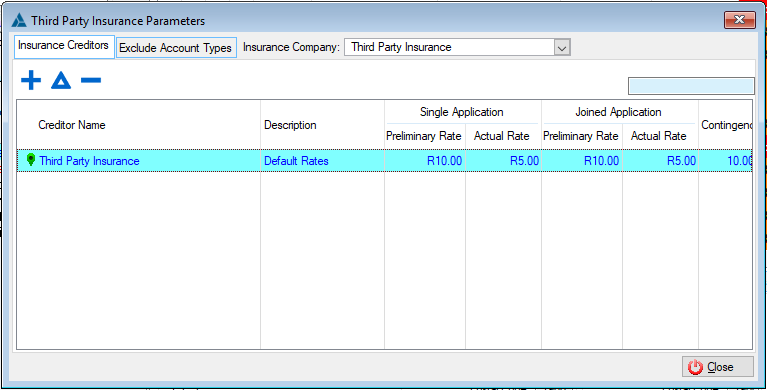
The following is an example of the 3rd Party Insurance Parameters Browse
Click on the following headings to expand:

|
·This browse allows the user to set up preliminary rates used as well as additional third party cover records inserted when activating the third party insurance. ·This browse allows the user to set up the default actual rates used when activating a third party insurance obligation on a client. ·The default rates can be applied to the third party insurance as a whole or to specific credit providers. ·The nature of each record inserted here is determined by the insurance type selected, namely:
The following is an example of the Third Party Insurance Parameters Browse
|
|
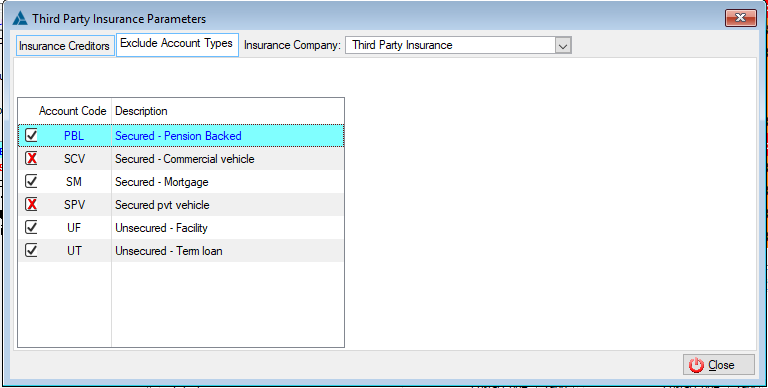
·Allows the user to exclude a specific account code. ·This will affect the client's total preliminary amount by excluding all client obligations using the account types marked with the
The following is an example of the Exclude Account Types
|