Life Cover Insurance
|
Navigation: The User Interface > What is in Simplicity > Main Menu > Master Data > Third Party Insurance Paramaters > Life Cover Insurance |
·This form allows a user to insert a new insurance creditor record to which certain default options can be applied
·This particular section will show the user what's involved when inserting an insurance creditor record when the "Life Cover" insurance type is selected.
·Any additional insurance creditor records inserted here as "Life Cover" will insert an additional insurance record to the client's obligations.
oThis additional obligation can be activated or deactivated separately and the amount can be edited by the user.
oThis additional record will not appear on the proposal but will be allocated a payment on the actual payment plan.
·This record will also add an expense to the client's budget called life cover.
·The amount inserted is determined by the following:
oThe difference between the client's minimum DCRS solve amount and the client's current affordability
oIf the amount calculated is smaller than the minimum then the minimum is used
oIf the amount calculated is larger than the maximum amount then the maximum amount is used
oIf the client does not solve on DCRS then the minimum amount will be used
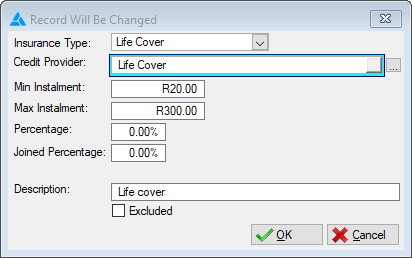
The following is an example of the 3rd Party Insurance Parameters Form
 The following fields can be found on the Life Cover Insurance form
|
·Insurance Type: oAllows the user to select an insurance type for the selected record. oThe insurance type selected will determine the behaviour of the insurance record.
·Credit Provider: oAllows the user to insert or select the credit provider for which the default rates will apply.
·Min Instalment: oAllows the user to insert the minimum instalment for the life cover insurance.
·Max Instalment: oAllows the user to insert the maximum instalment for the life cover insurance.
·Description: oAllows the user to insert the description for the Default Rate Record. |