SMS Settings
Program Navigation: Simplicity > toolbar Frame > Master Data > Company Parameters > Addresses
|
Navigation: The User Interface > What is in Simplicity > Main Menu > Master Data > Company Parameters > Contact Details > SMS SettingsProgram Navigation: Simplicity > toolbar Frame > Master Data > Company Parameters > Addresses |
oThis form allows the user to capture the company's outgoing SMS account settings in order to send text messages to clients directly from Simplicity.
oIf you are not currently registered with an sms provider register with our supported sms provider Mr Messaging.
§Contact Alex at Mr Messaging (alex.lunn@mrmessaging.net) and reference Bitech in order to qualify for the discounted rate.
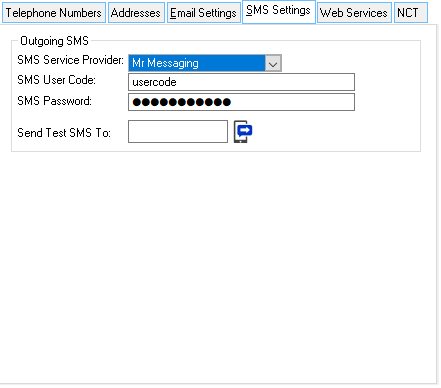
This is an example of the SMS settings form.
 The following settings can be inserted:
|
·SMS Service provider: oThe SMS service provider with whom the DC's company is registered (e.g. WinSMS or My Mobile).
·SMS User code: oThe user-name used to log into the SMS account.
·SMS Password: oThe SMS account password.
·Send Test SMS: oThis allows the user to send a test SMS to see if the SMS settings work and that they are correct. |
General Features available in the form: