Email Settings
Program Navigation: Simplicity > toolbar Frame > Master Data > Company Parameters > Email Settings
|
Navigation: The User Interface > What is in Simplicity > Main Menu > Master Data > Company Parameters > Contact Details > Email SettingsProgram Navigation: Simplicity > toolbar Frame > Master Data > Company Parameters > Email Settings |
oThis form allows the user to capture the company's outgoing mail server settings in order to make use of the Simplicity email Feature
oThe settings can also be tested by use of the "Send test Email Button"
oNote for Gmail users: to allow the account to work go to account security and set "allow secure apps".
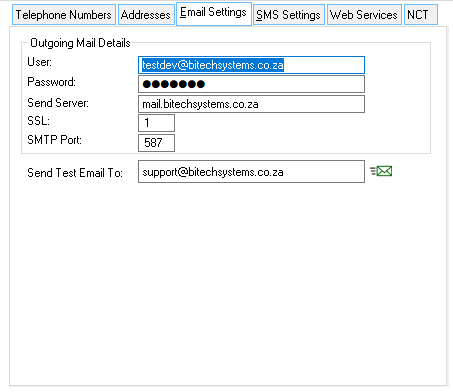
This is an example of the Emails settings form.
 The following settings can be inserted:
|
·User oThe user-name used to log into the mail server.
·Password: oThe mail account password.
·Send Server: oThe server used for outgoing emails (usually looks something like "mail.domain.co.za" or "smtp.domain.co.za").
·SSL: o (0 = off, 1 = on) Used for mail accounts using secure sockets such as a Google account or a secure corporate mail account.
·SMTP Port: oThe port used for outgoing SMTP mail, default is 25 (secure ports are usually 465 or 586).
·Send Test Email: oAllows the user to send a test email using the inserted outgoing mail details. |