Legal Fee Rates
Program Navigation: Simplicity > toolbar Frame > Master Data > Fee Master Table > Legal Fee Rates
|
Navigation: The User Interface > What is in Simplicity > Main Menu > Master Data > Fee Master Table > Legal Fees > Legal Fee RatesProgram Navigation: Simplicity > toolbar Frame > Master Data > Fee Master Table > Legal Fee Rates |
oThis browse allows the user to insert default legal fee amounts for clients based on the individual client's affordability by use of an affordability range.
oMultiple records can be inserted in order to insert a different rate for a different range.
oThe Rate chosen can either be a fixed amount or a percentage of the client's affordability.
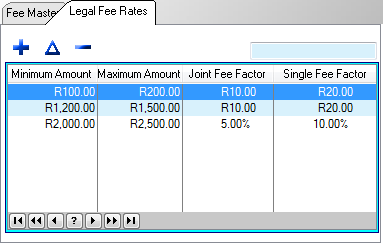
This is an example of the Legal Fee Rates Browse.
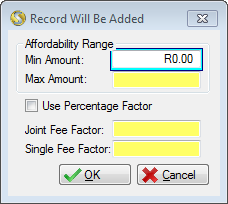
This is an example of the Legal Fee Rates form.
 Below is a list of fields that can be found in the legal fee rates form:
|
·Minimum Amount: oThis field allows the user to set a minimum figure for the affordability range.
·Maximum Amount: oThis field allows the user to set a maximum figure for the affordability range.
·Use Percentage Factor: oChecking this box will cause any figure inserted in the "Joint Fee Factor" and "Single Fee Factor" fields to be treated as a percentage of the client's affordability.
·Joint Fee Factor: oAllows the user to insert a figure for the legal fee amount to be charged based on the associated affordability range. oThis figure only applies to clients with a joined application. oThe figure can be either a fixed amount or a percentage figure (if the "Use Percentage Factor" check-box has been selected).
·Single Fee Factor: oAllows the user to insert a figure for the legal fee amount to be charged based on the associated affordability range. oThis figure only applies to clients with a Single application. oThe figure can be either a fixed amount or a percentage figure (if the "Use Percentage Factor" check-box has been selected). |
General Features available in this window:
Ø  Insert
Ø  Change
Ø  Delete
Ø OK
Ø Cancel