Restructure Fees
Program Navigation: Simplicity > toolbar Frame > Master Data > Fee Master Table > Restructure Fees
|
Navigation: The User Interface > What is in Simplicity > Main Menu > Master Data > Fee Master Table > Restructure FeesProgram Navigation: Simplicity > toolbar Frame > Master Data > Fee Master Table > Restructure Fees |
oThis form allows the user to set the default values for client Restructure fees such as the default fee creditor.
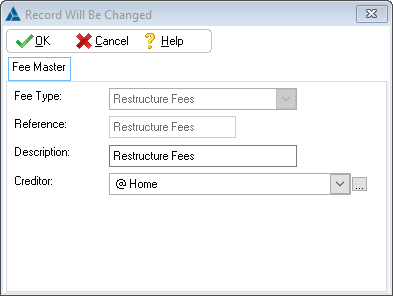
This is an example of the Restructure fees form.
 Below is a list of options that can be adjusted or viewed in the Fees Form:
|
·Reference: oThis field displays the default reference that is used for a client's Restructure fee record.
·Description: oThis fields allows the user to insert/edit the description used for the Restructure fees record on the Fee Master Table browse only.
·Creditor: oThis field allows the user to select the default creditor to which the PDA must make Restructure fee payments.
·Disable PDA Collection: oOnce this box is checked, the "Hold (Stop PDA Collection)" check-boxes for the *Legal* (restructure) fees of all future added clients will be automatically checked. |
General Features available in this window:
Ø Look Up