General Information
Program Navigation: Simplicity > toolbar Frame > Master Data > Company Parameters > General Information
|
Navigation: The User Interface > What is in Simplicity > Main Menu > Master Data > Company Parameters > General InformationProgram Navigation: Simplicity > toolbar Frame > Master Data > Company Parameters > General Information |
oThis form allows the user to capture basic company details such as the Company name and registration details.
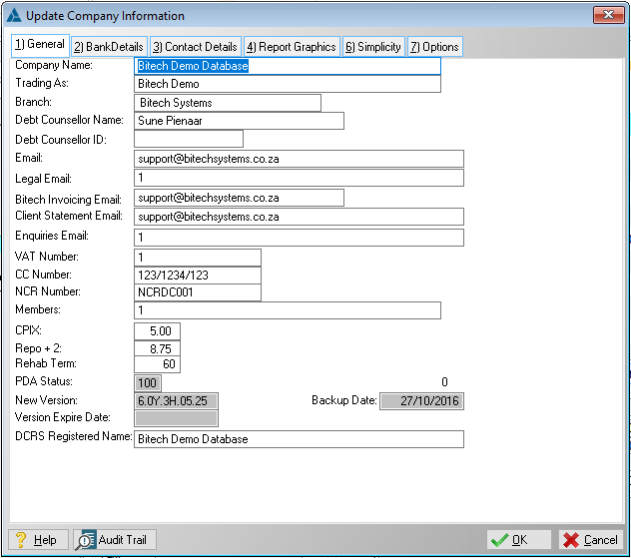
This is an example of the general information form.
 Below is a list of fields that affect other features in Simplicity:
|
·Company Name: oAllows the user to inserted name of the company, also appears on most Debt Counseling Reports.
·Trading as: oAllows the user to insert the name under which the company operates.
·Branch: oAllows the user to insert the branch of the company, also appears on most Debt Counselling Reports.
·Debt Counsellor Name: oAllows the user to insert the Name of the Debt Counsellor, also appears on most Debt Counselling Reports.
·Debt Counsellor ID: oAllows the user to insert the ID number of the Debt Counsellor, also appears on most Debt Counselling Reports.
·Email: oAllows the user to insert the main email address of the company, also appears on most Debt Counselling Reports.
·Legal Email: oAllows the user to insert the email address used for the company's legal documentation, also appears on the NCT Report.
·Bitech Invoicing Email: oInserts an additional email option "Self" when emailing the following reports: oClient Debt Counsel Reports oMerged document
·Client Statement Email: oThe email address to which Hyphen client statements will be sent when uploading a client to Hyphen with the option "Send Hyphen client statements to DC e-mail only" selected.
·Enquiries Email: oAllows the user to insert an email address used for inquiries. oMany debt counsellor companies uses different emails for different departments.
·VAT Number: oAllows the user to insert the VAT number of the company, also activates the "VAT Rate" field.
·NCR Number: oAllows the user to insert the company's NCR number, also appears on most Debt Counselling Reports.
·Member: o Allows the user to insert a list of members involved in the company
·VAT Rate: oAllows the user to insert the VAT rate for the company, also activates VAT on all client's' fees (Causes all fee records to be vat inclusive, this Includes aftercare fees, Restructure fees and Legal fees). oThis will cause all proposals to re-calculate for clients added before the vat rate was inserted. |
General Features available in this window: