Form 16
|
Navigation: The User Interface > What is in Simplicity > Toolbar > Tasks (Browse) > Task Reports > Form 16 |
oThis window allows the user to print the form 16 application form for the selected client.
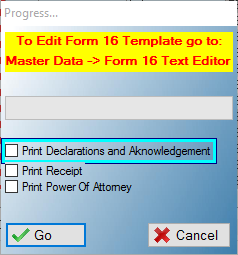
This is an example of the Form 16 window
 The following features can be found on the Form 16 Window:
|
·Print Declarations and Acknowledgement: oThis option will include the Declaration by the Applicant as well as the Acknowledgement of obligation such as fees involved in the report.
·Print Receipt: oThis option will include the Receipt of Application For Debt Review in the report.
·Print Power Of Attorney: oThis option will include the Mandate and Power Of Attorney in the report (Only applies if the "Print Declarations and Acknowledgement" option is also selected). |