Creditor + Email Reports
Program Navigation: toolbar > Clients > DC Reports > Creditor + Email Reports
|
Navigation: The User Interface > What is in Simplicity > Toolbar > Clients (Browse) > Generate Tickets > Creditor + Email ReportsProgram Navigation: toolbar > Clients > DC Reports > Creditor + Email Reports |
·This control allows the user to print or email various client creditor reports.
·An Email with the attached report can be created from this window.
·A CRM record with the attached report can be created from this window.
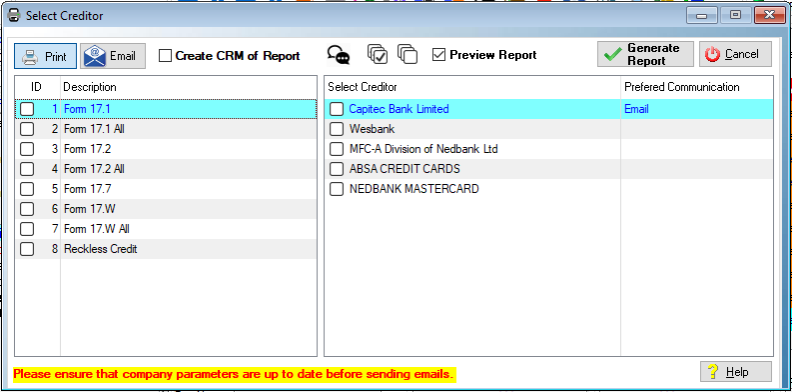
This is an example of the DC Reports window
 The Following can be found on the Creditor + Email Reports browse:
|
oThis control allows the user to print the selected report/s for the selected creditor/s. oThis option will send the report directly to the default printer if the "Preview" and/or the "Create CRM of Report" options are not selected.
oThis control allows the user to email the selected reports/s to the selected creditor contact person/s using the selected email program (default email, Simplicity email). oThe selected reports will be attached to the generated email for the selected creditor contact person/s. oA separate email will be created for each selected credit provider.
Create CRM of Report (Only available for "Print" option): oThis option will create a separate CRM record for each selected report for the selected credit provider, the associated report will be attached to each CRM record. oReports cannot be previewed when this option is selected.
oAllows the user to view/maintain the CRM records for the selected client creditor.
oAllows the user to tag all client creditors, reports will be generated for all tagged client creditors.
oAllows the user to un-tag all client creditors.
Preview Report(Only available for "Print" option): oAllows the user to display a preview of the reports before printing or saving as PDF.
Email Program: oAllows the user to select the email program with which to send the email to the client creditor contact person/s.
oSimplicity Email: This option makes use of the Simplicity email feature to send the emails to the client creditor contact person/s. oDefault Email: This option makes use of the workstation's default email program to send the emails to the client creditor contact person/s (Outlook, Thunderbird, Incredimail).
Generate Reports: oThis control allows the user to perform the selected action (print or email) for the selected reports and client creditor contact persons.
Type: oThis allows the user to select the contact to which the email must be send to and to select other contact persons (CC) that must be included in the email.
oEmail To: Allows the user to select the contact person that must receive the email. oCC To: Allows the user to select the contact person/s that must receive a duplicate of the email sent to the original contact person. |


