Branches
Program Navigation: Simplicity > toolbar Frame > Master Data > Branches
|
Navigation: The User Interface > What is in Simplicity > Main Menu > Master Data > BranchesProgram Navigation: Simplicity > toolbar Frame > Master Data > Branches |
·This browse allows a user to insert a branch to which specific clients can be linked
·A branch can be assigned separate PDA details which will determine to whom a linked client's aftercare fees will be paid
·A separate logo can be assigned which will affect a linked client's debt counsel reports
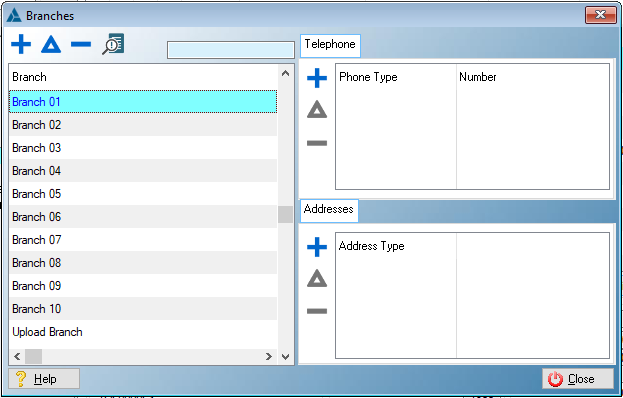
This is an example of the Branches browse
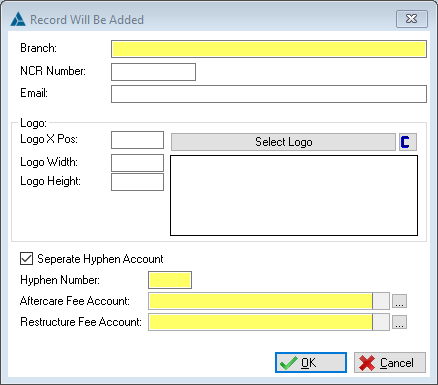
This is an example of the Branches form
 Below is a list of fields available on the Branches Form:
|
·Branch: oThis field allows the user to insert the branch name.
·NCR Number: oThis field allows the user to insert an NCR number for the branch (If Available).
·Email: oThis field allows the user to insert an email address that will be displayed on most debt counsel reports for clients linked to this branch.
·Logo: oThis field allows the user to insert a logo that will be displayed on most debt counsel reports for clients linked to this branch oThe logo is inserted as a picture which is selected from a file located on the local PC. The logo inserted here will appear on most Debt Counselling Reports. oThe Logo can also be extracted from the database and saved as a file on the local PC.
·The Dimensions of the logo can also be altered if desired (All settings are affected by the DPI settings of the local PC): oLogo X Position: oDetermines the position of the logo on the X-axis (Horizontal), (0 = Extreme left).
oLogo width: oDetermines the width of the logo.
oLogo Height: oDetermines the height of the logo.
oOnce this has been checked, the aftercare fees and restructure fees of any client linked to this branch will be paid to the associated Hyphen Company and creditor that was selected or inserted by the user. oIf the user wants this feature they must contact Bitech Systems.
·Hyphen Number: oThis field displays the Hyphen Company linked to this branch.
·Aftercare Fee Account: oThis is the Creditor to which this branch's aftercare fees will be paid to.
·Restructure Fee Account: oThis is the Creditor to which this branch's restructure fees will be paid to. |
The following browsers from part of the Branches browse:
General Features available in this window:
Ø  Insert
Ø  Change
Ø  Delete

Ø Browse
Ø Forms
Ø Close
Ø Cancel
Ø OK