Bitech Debit Order
Program Navigation: Simplicity > toolbar Frame > Master Data > Bitech Debit Order
|
Navigation: The User Interface > What is in Simplicity > Main Menu > Master Data > Bitech Debit OrderProgram Navigation: Simplicity > toolbar Frame > Master Data > Bitech Debit Order |
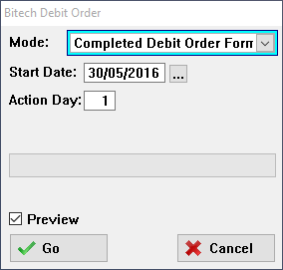
·This window allows the user to print a Bitech debit order form used for the program license fee.
·The report can either be printed with or without the company details inserted in the "Company Parameters" window.
This is an example of the Bitech Debit Order form
 The following fields can be found on the Debit Oder window:
|
·Mode: oThis field allows the user to select whether to print a blank debit order form or a completed debit order form that will contain the company's information.
·Start Day: oThis field allows the user to select the date the debit order must start.
·Action Day: oThis field allows the user to insert the day on which each month's debit order must go off.
·Preview: oThis check-box allows the user to view the Bitech Debit Order Form before printing or saving.
|
General Features available in this window:
Ø Look Up
Ø Cancel
Ø Calendar