Options
Program Navigation: Simplicity > toolbar Frame > Master Data > Company Parameters > Watermark
|
Navigation: The User Interface > What is in Simplicity > Main Menu > Master Data > Company Parameters > OptionsProgram Navigation: Simplicity > toolbar Frame > Master Data > Company Parameters > Watermark |
oThis window allows the user to activate/de-activate certain features in the program, these options affect the program as a whole.
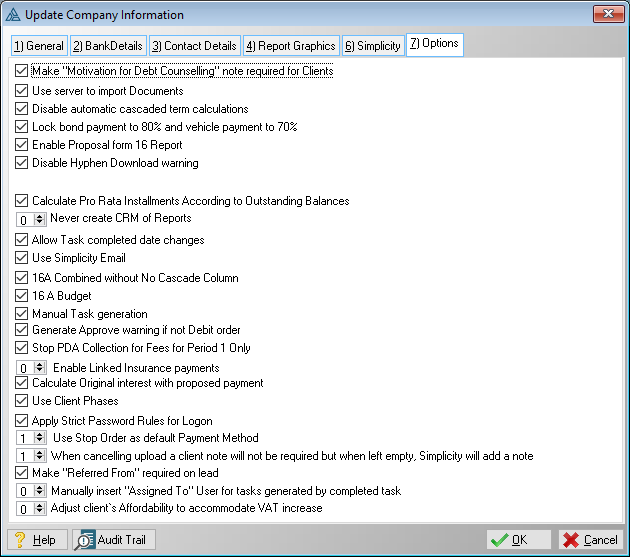
This is an example of the Options form.
 Below is a list of options that can be adjusted:
|
·Make client motivation required: oThis option will change the nature of the "Motivation for Debt Counselling" field found in the "notes" tab in the "Client Info" window, making this field a mandatory field.
·Use server to import Documents: oThis option makes use of an alternative method of importing documents into the database.
·Lock Bond Payment to 80% and vehicle payment to 70%: oThis option will give the user the option of inserting 80% or 70% of the original gross monthly instalment of an obligation when locking the proposed instalments using the NCA account type "Bond" or "Vehicle" respectively.
·Enable proposal form 16 Report: oThis option inserts an additional report (Form 16 with Proposal) when clicking on the "Reports" control found on the Client Browse.
·Disable Hyphen Download Warning: oThis option will remove the message window that is displayed warning the user that there are clients with the "Upload Changes to PDA" status.
·Always create creditor Debt counsel reports: oThis option will mark the "Create CRM of Report" option by default (Found on the "Creditor Reports + Email" and "Client Reports + Email" windows).
·Allow Task completed date changes: oThis allows a Task's "Date Done" field to be edited.
·Use Simplicity email: oThis option activates the "Simplicity Email" feature, it also adds a "Simplicity Email" option to the "Creditor Reports + Email" and "Client Reports + Email" windows.
·16A combined without No Cascade column: oThis option removes the "No Cascade" column from the Form 16A Combined.
·16A Budget: oThis option replaces the Form 16A (Debt Restructuring Proposal) with a Form 16A (Debt Restructuring Budget).
·Manual task generation: oThis option allows the user to manually insert the list of tasks for a client by clicking on the plus button on the tasks tab on the client browse.
·Generate Approve warning if not Debit order: oThis option prevents a client from being uploaded if the client's payment method is not "Debit Order".
·Stop PDA Collection for fees for period 1 only: oThis option will cause fees to remain on hold on the plan for period 1 only when using the "Hold (Stop PDA Collection)" feature on the client fee form.
·Linked Insurance option: o0. This option will insert linked insurance payments. o 1. This option will remove linked insurance payments for the duration of the interim period. This will apply to both the proposal and actual plan of pro-rata cases - This will not apply to DCRS proposals but will apply to the actual payment plan. o2. This option will remove linked insurance payments for period 1 only. This will apply to both the proposal and actual plan of pro-rata cases - This will not apply to DCRS proposals but will apply to the actual payment plan. o3. This option will remove linked insurance payments for the duration of the interim period. This will apply to both the proposal and actual plan of pro-rata cases - This will not apply to DCRS proposals or the actual payment plan. o4. This option will remove linked insurance payments for period 1 only. This will apply to both the proposal and actual plan of pro-rata cases - This will not apply to DCRS proposals or the actual payment plan.
·Use client Phases: oThis option will activate the client phases feature in Simplicity.
·Payment Method option: o0. This option will set "Debit Order" as a new client's default Payment Method. o1. This option will set "Stop Order" as a new client's default Payment Method. o2. This option will set "EFT" as a new client's default Payment Method. o3. This option will set "Cash" as a new client's default Payment Method.
·Upload Warning: oThese options will determine whether or not a user will receive an upload warning and whether or not the warning will require a note. §0 - When cancelling an upload the client note on the uploading warning window will not be required, will be added if a note is inserted on the upload warning window. §1 - When cancelling an upload a the client note on the uploading warning window will not be required but if left empty, Simplicity will add a client note. §2 - When cancelling an upload the client note on the upload warning window will be required. §3 - When cancelling an upload no upload warning window will appear.
·Make Lead Referral required: oThis option will change the nature of the "Referred From" field found in the "Lead" tab in the "Lead Info" window, making this field a mandatory field.
·Completed task options: o0. This option will allow the user to manually insert an "Assigned To" User for all tasks generated when completing a task. o1. This option will automatically insert the "Completed By" User as the "Assigned To" User for all tasks generated when completing a task o2. This option will automatically insert the "Completed By" User as the "Assigned To" User for all tasks generated when completing a task that fall within the same phases the completed task.
·Adjust client's affordability to accommodate VAT increase: §This spin box option allows the user to select how the increased VAT amount on existing client plans must be handled. ·0(This is default) - The money can be added to the client's affordability, this effectively means that the client pay for the VAT increase. ·1 - The money can be taken from the client's obligation distributions, this effectively means that the creditor pay for the VAT increase.
oShow Paydate Management on Actual Payment Plan: oWhen activated, the payment plan, when calculated, will reflect the date changes to a preceding business day where the strike falls on a Sunday or public holiday. When deactivated, the plan will not reflect the date changes however Hyphen's paydate management will still remain active. |
General Features available in the form:
Ø Spin Box