Logo
Program Navigation: Simplicity > toolbar Frame > Master Data > Company Parameters > Logo
|
Navigation: The User Interface > What is in Simplicity > Main Menu > Master Data > Company Parameters > Report Graphics > LogoProgram Navigation: Simplicity > toolbar Frame > Master Data > Company Parameters > Logo |
oThis form allows the user to insert the company's logo into the database.
oThe logo is inserted as a picture which is selected from a file located on the local PC.
oThe logo inserted here will appear on most Debt Counseling Reports.
oThe Logo can also be extracted from the database and saved as a file on the local PC.
oThe Dimensions of the logo can also be altered if desired (All settings are affected by the DPI settings of the local PC).
oThe logo format must be "jpeg".
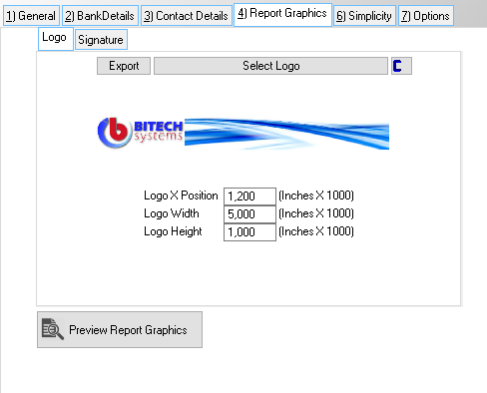
This is an example of the Logo form
 The following settings can be inserted:
|
·Export: oAllows the user to export the inserted logo as a picture and save it to a specific destination.
·Select Logo: oAllows the user to insert a logo by selecting a picture from a specific location.
·
oAllows the user to clear the currently inserted logo.
·Logo X Position: oDetermines the position of the logo on the X-axis (Horizontal), (0 = Extreme left).
·Logo width: o Determines the width of the logo.
·Logo Height: o Determines the height of the logo.
·Preview Report Graphics: oThis control will allow the user to preview the logo on a report. |
