Payments Per Collection Type
oThis window allows the user to print a report displaying all payments made for certain periods and certain collection types.
oThis window also allows the user to export the details to a CSV file e.g. Excel.
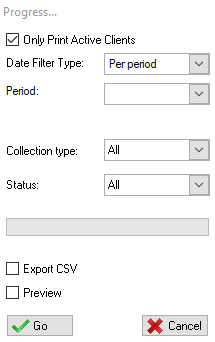
This is an example of the Payments Per Collection Type report Window
 The following fields can be found on the Payments Per Collection type window:
|
·Only Print Active Clients: oThis tick box will allow the user to only print active clients.
·Date Filter Type: oThis list allows the user to select a date or period for the report.
·Start Date: oThis field allows the user to select the start date for when the collection started.
·End Date: oThis field allows the user to select the end date for when the collection ended.
·Collection Type: oThis list allows the user to select the collection type for the report.
·Status: oThis list allows the user to select the.
·Preview: oThis check box allows the user to display a preview of the payments per collection type report. |