Paid Up Account Check
Program Navigation: Simplicity > toolbar > toolbar Reports > Payment Reports > Paid Up Account Check
oThis window allows the user to print a report displaying all the paid up accounts for the clients.
oThis window also allows the user to export the details to a CSV file e.g. Excel.
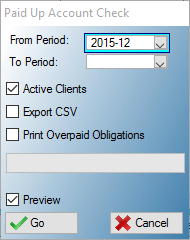
This is an example of the Paid Up Account Check report Window
 The following fields can be found on the Paid up Account Check window:
|
·From Period: oThis list allows the user to select a period from for the report.
·To Period: oThis list allows the user to select a period to for the report.
·Active Clients: oThis check box allows the user to include active clients on the report.
·Paid Overpaid Obligations: oThis check box allows the user to print overpaid obligations on the report.
·Preview: oThis check box allows the user to display a preview of the paid up account check report. |