DC/ Consultants
Program Navigation: Simplicity > toolbar Frame > Master Data > DC/Consultants
|
Navigation: The User Interface > What is in Simplicity > Main Menu > Master Data > DC/ ConsultantsProgram Navigation: Simplicity > toolbar Frame > Master Data > DC/Consultants |
·The DC consultants browse allows the user to insert new Debt Counsellor or consultants into the database.
·The consultant's NCR number and signature can be inserted where applicable which will cause Simplicity to treat this consultant as a DC and all the client's debt counsel reports will display the consultant's NCR number and signature.
·Consultants can be linked to a branch and log in user which will affect which clients the consultant can view when using the "Per Branch" Filter on the Client Browse (if security is set).
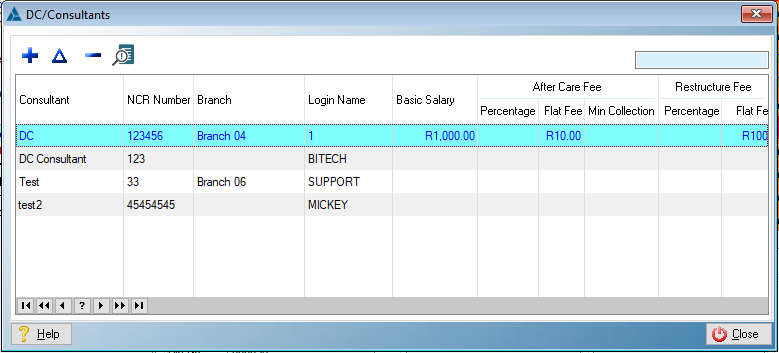
This is an example of the DC Consultants browse
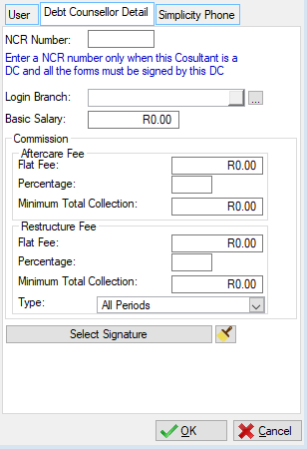
This is an example of the DC Consultants form
 The following fields can be found in the Consultants browse:
|
·Consultant: oThis field allows the user to insert the consultant's name.
·NCR Number: oThis field allows the user to insert an NCR number for the consultant. oThe Consultant's Name, NCR Number, email address and signature will be displayed on the debt counsel reports for any consultant that contains an NCR number.
·Login Branch: oThis field allows the user to insert the branch under which the consultant operates.
·Login Name: oThis field allows the user to select a Simplicity Login User Name for the Consultant. §When the selected login user logs into Simplicity, that user will operate under this Consultant and the associated Login Branch
·Email: oThis field allows the user to insert an email address for the consultant. oThis Email address will be displayed on the debt counsel reports for any consultant that contains an NCR number.
·Basic salary: oThis field allows the user to insert a basic salary figure for this Consultant.
·Commission: oThis section allows the user to insert a Commission figure for this Consultant.
·Aftercare Fee: o This section allows the user to insert a commission figure based on the client's aftercare fee payments.
·Flat Fee: oAllows the user to insert a flat fee figure per aftercare fee payment.
·Percentage: oAllows the user to insert a percentage figure which will assign a percentage of each aftercare payment to the consultant.
·Restructure Fee: oThis section allows the user to insert a commission figure based on the client's Restructure fee payments.
·Flat Fee: oAllows the user to insert a figure which will assign a fixed amount to the consultant for each Restructure payment.
·Percentage: oAllows the user to insert a percentage figure which will assign a percentage of each Restructure payment to the consultant. ·Type: oAllows the user to select criteria to which the commission should apply
·All Periods: oThe commission settings apply to all periods on the client's plan
·First Period Only: oThe Commission settings will apply to the first period of the client's plan only
·First Successful Period Only: oThe Commission settings will apply to the first successful (Paid) period of the client's plan.
·Signature: oThis control allows the user to insert the Consultant's signature into the database. oThe signature is inserted as a picture which is selected from a file located on the local PC. oThis Signature will be displayed on the debt counsel reports for any consultant that contains an NCR number |
General Features available in this window:
Ø  Insert
Ø  Change
Ø  Delete

Ø Browse
Ø Forms
Ø Look up
Ø OK
Ø Cancel
Ø Close
Ø Sort