Credit Bureaus Form
Program Navigation: Simplicity > toolbar Frame > Master Data > Credit Bureaus > Credit Bureaus Form
|
Navigation: The User Interface > What is in Simplicity > Main Menu > Master Data > Credit Bureaus > Credit Bureaus FormProgram Navigation: Simplicity > toolbar Frame > Master Data > Credit Bureaus > Credit Bureaus Form |
·This form allows the user to insert/edit Credit Bureau account credentials.
·Simplicity incorporates a fully integrated Credit Bureau check feature with which to insert and update client and obligation information.
·Please contact Bitech Systems for more information and for assistance in registering with one of our supported credit bureaus.
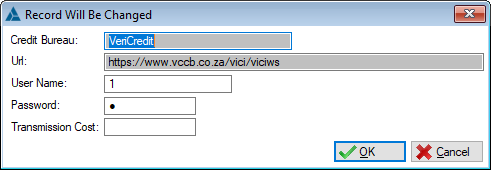
This is an example of the Credit Bureaus form
 The following fields can be found on the Credit Bureaus form:
|
·Credit Bureau: oThis field displays the Name of the Credit Bureau.
·URL: oThis field displays the web-service connection address details of the Credit Bureau.
·User Name: oThis field allows the user to insert the user name used to log into the Credit Bureau account.
·Password: oThis field allows the user to insert the Password used to log into the Credit Bureau account.
·Transmission Cost: oThis field allows the user to insert the current transmission cost per transaction. (This field does not determine the actual cost charged by the Credit Bureau). |
General Features available in this window:
Ø Form
Ø OK
Ø Cancel