Client Processes Due
oThis window allows the user to print a report that displays all clients for whom 1 or more obligations have form 17.1 dates but no form 17.2 dates.
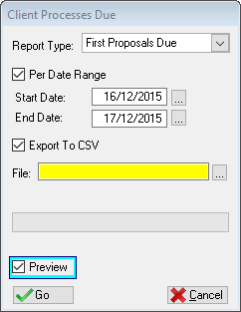
This is an example of the Client Processes due Window
 The following fields can be found on the Client Processes due report window:
|
·Report Type: oThis option filters the list according to how old the Form 17.1 date is:
oFirst Proposals due: 10 work days after the Form 17.1 date oProgress Reports due: 25 work days after the Form 17.1 date oFinal Proposals due: 35 work days after the Form 17.1 date
·Per Date Range: oAllows the user to insert a date by which to filter the list of clients further.
·Start Date: oWill filter the list by displaying all clients that have a Form 17.1 date later than the inserted date.
·End Date: oWill filter the list by displaying all clients that have a Form 17.1 date earlier than the inserted date.
·Export to CSV: oAllows the user to export the list to a .csv file format.
·File: oAllows the user to select/insert a file name for the csv file.
·Preview: oThis check box allows the user to display a preview of the client processes due report. |