Client Per Income Range
oThis window allows the user to print a report displaying the client income from lowest income to highest income.
oThis window also allows the user to export the details to a CSV file e.g. Excel.
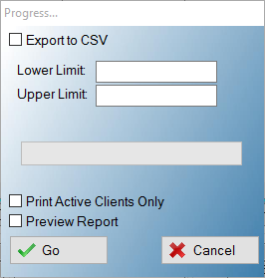
This is an example of the Client per income range report Window
 The following fields can be found on the Client per income range report window:
|
·Lower Limit: oThis field allows the user to insert a lower limit for the salary.
·Upper Limit: oThis field allows the user to insert an upper limit for the salary.
·Print active clients only: oThis check box allows the user to print only the active clients on the report.
·Preview: oThis check box allows the user to display a preview of the creditors per income report. |